
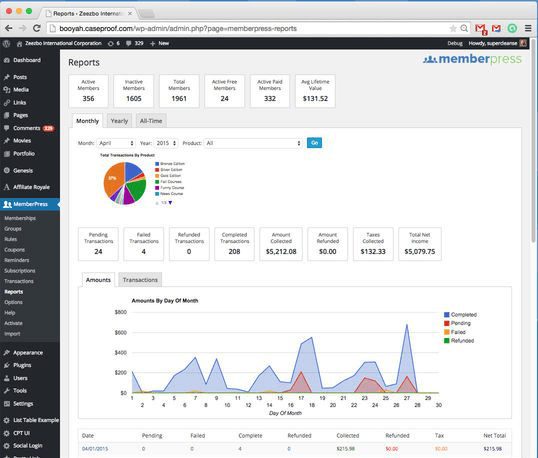
MemberPress WordPress Plugin
Version 1.11.22
SKU: 956
One-time payment · lifetime access to this file
- Instant download after purchase
- 100% original, unmodified GPL file
- Free lifetime updates on request
- Secure Razorpay / PayPal checkout
Product details
- Version on file
- 1.11.22
- Developer
- Caseproof, LLC
- Released
- 2022/10/19
- File size
- 4.10 MB
- License
- GPL
About MemberPress WordPress Plugin 1.11.22
MemberPress is a membership plugin for WordPress, from Caseproof. It lets you charge for access to your content: you create membership products, connect a payment gateway, and the plugin handles sign-up, billing and who is allowed to see what.
Access is controlled by rules. You can grant or revoke access to posts, pages, categories, tags, feeds, communities and digital files, based on the product a member has bought or subscribed to. That covers common cases such as a paid blog, a members-only resource area, tiered plans, and the sale of downloadable files.
It integrates with your existing WordPress site instead of running as a separate system, so you keep your theme and other plugins. It is a membership tool, not a full online store: for physical products and a cart you'd normally pair it with WooCommerce or use a connector.
Key features
- Membership products
- Create plans and sell them as one-off payments or recurring subscriptions.
- Content rules
- Control access to posts, pages, categories, tags, feeds and files by membership level.
- Payment gateways
- Enter your payment gateway details and take payments on your own site.
- Digital downloads
- Sell downloadable files and limit who can fetch them.
- Track subscriptions
- See your members and their subscriptions, and manage them in the dashboard.
- Works with your site
- Runs inside your existing WordPress site, alongside your theme, content and other plugins.
Is it right for you?
A good fit for
- Publishers, coaches and educators who charge for content or resources
- Sites that want tiered plans with different access for each
- Businesses that want to sell digital files and gated content together
Look elsewhere if
- Shops selling mostly physical products, where WooCommerce is the main tool
- Sites that only need a simple contact form or login, with no payments
How to install MemberPress WordPress Plugin 1.11.22
- 1
Download the file
Open My Account → Downloads and download the product. If the archive contains several zips (documentation, child theme, licensing files), you need the one named after the product.
- 2
Upload it to WordPress
In your dashboard go to Plugins → Add New Plugin → Upload Plugin and choose the zip.
- 3
Install and activate
Click Install Now, then Activate. If an older or free copy is already installed, WordPress offers to replace it with the uploaded version.
Notes for this product
- MemberPress add-ons, such as its WooCommerce connector and invoice add-on, are separate files that need this core plugin installed first.
Setup: using MemberPress WordPress Plugin 1.11.22
- Open the settings. After activating, open MemberPress in the dashboard menu and review the settings and the pages it creates for sign-up, login and account.
- Connect a payment gateway. Add your payment gateway details so you can take payments.
- Create a membership. Add a membership product with a price, a billing period and a description.
- Create access rules. Set up rules that choose which content each membership can see.
- Add a registration page link. Link to the membership's sign-up page from your site's menu or sales page.
- Test the whole flow. Sign up with a test account, pay in test mode, and confirm that the right content opens.
Common problems and fixes
Members see an unauthorized message on content they should access
- Why it happens
- A rule doesn't cover that content, or a page cache is serving the restricted version to logged-in members.
- How to fix it
- Check the access rules for the page, and exclude members' pages and logged-in users from page caching.
Payments go through but memberships stay pending
- Why it happens
- The payment service's notifications (webhooks) aren't reaching your site, often blocked by a security plugin, firewall or cache.
- How to fix it
- Check the webhook or notification address in your payment gateway, whitelist it in your security plugin, and resend a failed notification.
Login, account or registration pages are missing
- Why it happens
- The pages MemberPress creates were deleted, or aren't assigned in its settings.
- How to fix it
- Open the MemberPress settings, check the Pages tab, and reassign or recreate the missing pages.
Members don't get emails
- Why it happens
- WordPress's default mail sending is unreliable on many hosts.
- How to fix it
- Connect an SMTP or transactional email service and send a test.
“The link you followed has expired.” when uploading
- Why it happens
- The zip is larger than your server's PHP upload limit (upload_max_filesize / post_max_size).
- How to fix it
- Raise the upload limit in your hosting control panel, or unzip the file and upload the folder to wp-content/plugins with your host's file manager or SFTP.
“The package could not be installed. No valid plugins were found.”
- Why it happens
- The uploaded zip is a bundle (or a theme), not the plugin itself.
- How to fix it
- Unzip the download once and upload the inner zip named after the plugin.
“Plugin could not be activated because it triggered a fatal error.”
- Why it happens
- Usually a PHP version older than the plugin needs, or a second copy of the same plugin (for example the free version) still active.
- How to fix it
- Check your PHP version under Tools → Site Health → Info, deactivate any other copy of the plugin, and enable WP_DEBUG_LOG to see the exact error.
Licence or “updates unavailable” notices
- Why it happens
- The developer's licence key isn't included. Features that call the developer's servers (template libraries, cloud APIs, automatic updates) need it.
- How to fix it
- Everything that runs locally works without it. For a newer file, use Request an update from your account.
Alternatives to MemberPress WordPress Plugin 1.11.22
| Product | Choose it if | Price |
|---|---|---|
| WPMU DEV Membership 2 Pro 1.1.5 | you want a different membership plugin to compare, aimed at gated content and subscriptions. | $4.25 |
Frequently asked questions
Can I restrict content by category or tag?
Yes. Rules can grant or limit access to posts, pages, categories, tags, feeds and files.
Can I sell digital downloads?
Yes. You can sell downloadable files and limit them to the members who bought them.
Do I need a separate payment gateway?
You enter the details of a payment gateway, and the plugin takes payments through it on your own site.
Is MemberPress a full online store?
No. It is a membership tool. For physical products and a cart, pair it with WooCommerce.
Will it work with my current theme?
It runs inside your WordPress site and works with most themes, since it uses ordinary pages for sign-up, login and account.
Categories: Membership, Content, E-commerce plugin, Plugins, Membership Plugin
Related products
 −93%
−93%YITH WooCommerce Quick Checkout for Digital Goods Premium 1.26.0
 −93%
−93%YITH WooCommerce Order Tracking Premium 2.14.0
 −93%
−93%YITH PayPal Payouts for WooCommerce 1.0.23
 −92%
−92%XPromoter – Top Bar Switcher Responsive WordPress Plugin 1.3.3
−92%WPMU DEV Ning To BuddyPress WordPress Plugin 1.2.2
 −92%
−92%WPForms Form Abandonment Addon 1.9.0
 −93%
−93%WpDiscuz – Media Uploader 7.0.10
 −85%
−85%