
EasyAzon Pro Download Plugin for Amazon Affiliates
Version 4.0.13
SKU: 5979
One-time payment · lifetime access to this file
- Instant download after purchase
- 100% original, unmodified GPL file
- Free lifetime updates on request
- Secure Razorpay / PayPal checkout
Product details
- Version on file
- 4.0.13
- Type
- Plugin
- Released
- September 27, 2017
About EasyAzon Pro Download Plugin for Amazon Affiliates 4.0.13
EasyAzon Pro is a WordPress plugin for people who earn commission as Amazon Associates. Instead of leaving your site to copy links from Amazon, you search for a product inside the WordPress editor and insert your affiliate link there. That saves time on review sites and comparison articles with many products.
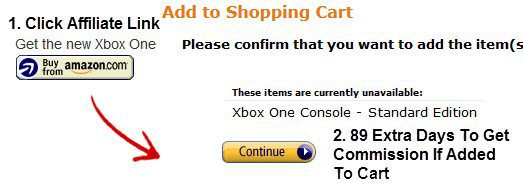
It gives you control over how links behave, site-wide or link by link: open in a new window, add a nofollow attribute, cloak the link for tidier URLs, show a product popup, or prompt a visitor to add the item to their cart. A link localiser also swaps a link for the Amazon store that matches the visitor's country, so international traffic can still earn commission.
The file is from September 2017, and Amazon has changed its affiliate programme rules and product data access since then. Check whether it still connects to Amazon on a staging site before you build content around it, and make sure you follow the Associates programme's current rules on how links and prices may be shown.
Requirements
- An Amazon Associates account
Key features
- Links from inside WordPress
- Find a product and insert your affiliate link from the editor, without leaving the dashboard.
- Site defaults or per-link control
- Set behaviour for every link, or override it for individual links.
- Link localisation
- Display the link for the Amazon store that matches the visitor's country, so international clicks can earn commission.
- Cloaking and nofollow
- Cloak links for tidier URLs and add a nofollow attribute where it's appropriate.
- Popups and add-to-cart prompts
- Show a product popup, or prompt visitors to add the item to their Amazon cart.
- New window option
- Open affiliate links in a new window so visitors keep your page open.
Is it right for you?
A good fit for
- Bloggers and review sites that earn from Amazon affiliate links
- Publishers with an international audience who want links to match visitors' countries
- Anyone who inserts many product links and wants to do it faster
Look elsewhere if
- Sites that don't take part in the Amazon Associates programme
- Anyone needing automatically updated price displays, which Amazon's rules now restrict
- Anyone not prepared to test whether this 2017 file still connects
How to install EasyAzon Pro Download Plugin for Amazon Affiliates 4.0.13
- 1
Download the file
Open My Account → Downloads and download the product. If the archive contains several zips (documentation, child theme, licensing files), you need the one named after the product.
- 2
Upload it to WordPress
In your dashboard go to Plugins → Add New Plugin → Upload Plugin and choose the zip.
- 3
Install and activate
Click Install Now, then Activate. If an older or free copy is already installed, WordPress offers to replace it with the uploaded version.
Notes for this product
- You need an Amazon Associates account and the connection details it requires. Check the plugin's settings screen for what it asks for.
Setup: using EasyAzon Pro Download Plugin for Amazon Affiliates 4.0.13
- Open the plugin settings. After activating, open the EasyAzon settings from the dashboard menu.
- Enter your Associates details. Add your Amazon Associates tracking ID and the connection details the plugin asks for.
- Set the link defaults. Choose new-window, nofollow, cloaking and localisation settings for all links.
- Insert a product link. In a post, use the EasyAzon button to search for a product and insert your link.
- Test the link. View the post while logged out and click the link to check it goes to Amazon with your tracking ID.
- Check the Associates rules. Make sure the way you show links and product details follows the Amazon Associates programme's current rules.
Common problems and fixes
Product search fails or returns nothing
- Why it happens
- The connection to Amazon's product data no longer works with this version, or the account details are wrong.
- How to fix it
- Re-enter the details from your Associates account. If it still fails, the file is too old for Amazon's current requirements, so use Request an update from your account.
Links go to the wrong Amazon store
- Why it happens
- Link localisation is off, or the visitor's country isn't mapped to a store.
- How to fix it
- Turn on localisation, add your tracking ID for each Amazon store you want to earn from, and test with a different country.
Cloaked links return a 404 error
- Why it happens
- WordPress's address rules haven't refreshed after turning cloaking on.
- How to fix it
- Go to Settings, Permalinks and click Save Changes.
“The link you followed has expired.” when uploading
- Why it happens
- The zip is larger than your server's PHP upload limit (upload_max_filesize / post_max_size).
- How to fix it
- Raise the upload limit in your hosting control panel, or unzip the file and upload the folder to wp-content/plugins with your host's file manager or SFTP.
“The package could not be installed. No valid plugins were found.”
- Why it happens
- The uploaded zip is a bundle (or a theme), not the plugin itself.
- How to fix it
- Unzip the download once and upload the inner zip named after the plugin.
“Plugin could not be activated because it triggered a fatal error.”
- Why it happens
- Usually a PHP version older than the plugin needs, or a second copy of the same plugin (for example the free version) still active.
- How to fix it
- Check your PHP version under Tools → Site Health → Info, deactivate any other copy of the plugin, and enable WP_DEBUG_LOG to see the exact error.
Licence or “updates unavailable” notices
- Why it happens
- The developer's licence key isn't included. Features that call the developer's servers (template libraries, cloud APIs, automatic updates) need it.
- How to fix it
- Everything that runs locally works without it. For a newer file, use Request an update from your account.
Alternatives to EasyAzon Pro Download Plugin for Amazon Affiliates 4.0.13
| Product | Choose it if | Price |
|---|---|---|
| AAWP-3.13 | you want to show product boxes, comparison tables and lists of Amazon products, not only text links. | $2.99 |
| SearchAzon – WooCommerce Amazon Affiliates Auto Search Plugin 1.3.0 | you run a WooCommerce site and want Amazon affiliate products imported into it. | $3.99 |
Frequently asked questions
Do I need an Amazon Associates account?
Yes. The plugin builds links that carry your Associates tracking ID, so you need an account.
Can it show visitors the right Amazon store?
Yes. Its link localiser swaps a link for the Amazon store that matches the visitor's country.
Should I nofollow affiliate links?
Search engines ask that paid or affiliate links are marked, and the plugin can add the attribute for you.
Is the file up to date?
It dates from September 2017, and Amazon has changed how plugins can access product data since. Test it before building content around it.
Categories: Marketing, Plugins
Related products
 −93%
−93%YITH WooCommerce Quick Checkout for Digital Goods Premium 1.26.0
 −93%
−93%YITH WooCommerce Order Tracking Premium 2.14.0
 −93%
−93%YITH PayPal Payouts for WooCommerce 1.0.23
 −92%
−92%XPromoter – Top Bar Switcher Responsive WordPress Plugin 1.3.3
−92%WPMU DEV Ning To BuddyPress WordPress Plugin 1.2.2
 −92%
−92%WPForms Form Abandonment Addon 1.9.0
 −93%
−93%WpDiscuz – Media Uploader 7.0.10
 −85%
−85%