
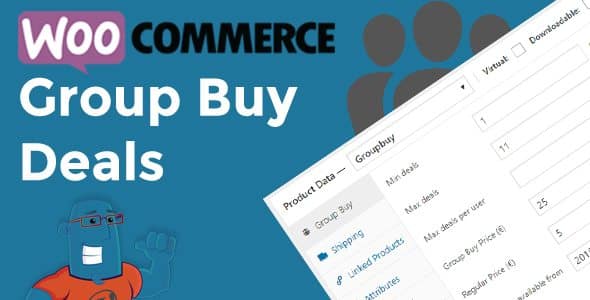
WooCommerce Group Buy and Deals Groupon Clone for Woocommerce 1.1.24
SKU: 10545
One-time payment · lifetime access to this file
- Instant download after purchase
- 100% original, unmodified GPL file
- Free lifetime updates on request
- Secure Razorpay / PayPal checkout
Product details
- Version on file
- 1.1.24
- Type
- plugin
- Released
- 04-02-2022
- File size
- 101.94 KB
- License
- GPL
About WooCommerce Group Buy and Deals Groupon Clone for Woocommerce 1.1.24
WooCommerce Group Buy and Deals extends WooCommerce with a new product type, Groupbuy, for running group-buying deals in the style of Groupon. A deal only goes ahead if enough people buy: you set a minimum and maximum number of participants, a start and end time, and the plugin tracks whether the deal succeeds or fails.
It handles the details around that: a limit on how many deals one customer can buy, instant finishing when the maximum is sold, refunds when a deal fails, and email notifications for a deal that wins, fails or finishes, with templates you can edit. Customers get a My deals page listing the deals they've joined, and deals can show on their own page or alongside your other products.
Refunding a failed deal only works if your payment processor supports it, so test the full flow with your gateway before you advertise a real deal. The listing text dates from when WooCommerce 3.3 was current, so also test the plugin with your current WooCommerce version on a staging site.
Requirements
- WooCommerce
Key features
- Group buy product type
- Adds a Groupbuy product type to WooCommerce, usable with simple, virtual or downloadable products.
- Minimum and maximum participants
- Set how many buyers a deal needs to succeed, and how many it can sell.
- Start and end times
- Schedule each deal, and relist it by hand if you want to run it again.
- Failure handling and refunds
- If a deal fails, buyers can be refunded, provided your payment processor supports it.
- Limits per customer
- Cap how many deals one person can buy.
- Email notifications
- Editable emails for a deal that wins, fails, finishes, or leaves a participant with no luck.
- My deals page
- Shoppers see active and purchased deals on a page created with the [my_groupbuys] shortcode.
- Widgets and display options
- Show deals ending soon, upcoming, latest or featured, and choose whether they sit among other products or on their own page.
Is it right for you?
A good fit for
- Stores that want to run time-limited deals that need a minimum number of buyers
- Merchants building a deals or daily-offers site on WooCommerce
- Shops that want deal widgets and a My deals page for customers
Look elsewhere if
- Stores whose payment processor can't issue refunds, since failed deals depend on them
- Shops that only want ordinary sale prices or coupons
- Sites that aren't on WooCommerce
How to install WooCommerce Group Buy and Deals Groupon Clone for Woocommerce 1.1.24
- 1
Download the file
Open My Account → Downloads and download the product. If the archive contains several zips (documentation, child theme, licensing files), you need the one named after the product.
- 2
Upload it to WordPress
In your dashboard go to Plugins → Add New Plugin → Upload Plugin and choose the zip.
- 3
Install and activate
Click Install Now, then Activate. If an older or free copy is already installed, WordPress offers to replace it with the uploaded version.
Notes for this product
- Check that your payment gateway supports refunds before running a live deal. Failed deals rely on them.
Setup: using WooCommerce Group Buy and Deals Groupon Clone for Woocommerce 1.1.24
- Create a Groupbuy product. In WooCommerce, add a product and choose the Groupbuy product type.
- Set the deal rules. Enter the minimum and maximum number of participants, the start and end times, and the limit per customer.
- Choose how deals are displayed. Decide whether deals appear alongside other products or on a separate page, and add the deal widgets you want.
- Create the My deals page. Add a page that uses the [my_groupbuys] shortcode so customers can see their deals.
- Edit the emails. Review the win, fail and finish emails and adjust the wording.
- Run a test deal. Join a deal with test accounts, let it succeed once and fail once, and check that emails and refunds behave.
Common problems and fixes
A deal failed but buyers weren't refunded
- Why it happens
- Your payment gateway doesn't support automatic refunds.
- How to fix it
- Use a gateway that can refund through WooCommerce, or refund failed-deal orders by hand, and test this before launching a deal.
Deals don't appear in the shop
- Why it happens
- The display setting puts deals on a separate page, or the deal hasn't started yet.
- How to fix it
- Check the deal's start time and the display setting, and link to the deals page from your menu.
Deals start or end at the wrong time
- Why it happens
- WordPress's time zone setting doesn't match your own.
- How to fix it
- Set the correct time zone in Settings, General and check the deal's schedule again.
The My deals page is empty or missing
- Why it happens
- No page uses the shortcode, or the customer isn't logged in.
- How to fix it
- Create a page containing [my_groupbuys] and make sure customers log in to view it.
“The link you followed has expired.” when uploading
- Why it happens
- The zip is larger than your server's PHP upload limit (upload_max_filesize / post_max_size).
- How to fix it
- Raise the upload limit in your hosting control panel, or unzip the file and upload the folder to wp-content/plugins with your host's file manager or SFTP.
“The package could not be installed. No valid plugins were found.”
- Why it happens
- The uploaded zip is a bundle (or a theme), not the plugin itself.
- How to fix it
- Unzip the download once and upload the inner zip named after the plugin.
“Plugin could not be activated because it triggered a fatal error.”
- Why it happens
- Usually a PHP version older than the plugin needs, or a second copy of the same plugin (for example the free version) still active.
- How to fix it
- Check your PHP version under Tools → Site Health → Info, deactivate any other copy of the plugin, and enable WP_DEBUG_LOG to see the exact error.
Licence or “updates unavailable” notices
- Why it happens
- The developer's licence key isn't included. Features that call the developer's servers (template libraries, cloud APIs, automatic updates) need it.
- How to fix it
- Everything that runs locally works without it. For a newer file, use Request an update from your account.
Frequently asked questions
What is a group buy?
A deal that only goes ahead if enough people buy. If the minimum isn't reached by the end time, the deal fails and buyers are refunded.
Can I use it with any product?
Group buys can be made from simple, virtual or downloadable WooCommerce products.
Will refunds happen automatically?
Only if your payment processor supports it. Test your gateway before running a live deal.
Can customers see their deals?
Yes. A My deals page, made with the [my_groupbuys] shortcode, lists their active and purchased deals.
Can several vendors run their own deals?
Not by itself. The description suggests pairing it with a third-party multivendor plugin for that.
Categories: Wordpress Plugins, Wordpress
Related products
 −93%
−93%Yottis | Personal Creative Portfolio WordPress Theme + Store 1.0
 −93%
−93%YITH PayPal Payouts for WooCommerce 1.0.23
 −93%
−93%Yankee – Insurance & Consulting WordPress Theme 1.3
 −92%
−92%XPromoter – Top Bar Switcher Responsive WordPress Plugin 1.3.3
 −93%
−93%WPMU DEV Fixer WordPress Theme 1.4.1
 −92%
−92%WPForms Form Abandonment Addon 1.9.0
 −93%
−93%WpDiscuz – Media Uploader 7.0.10
 −84%
−84%