
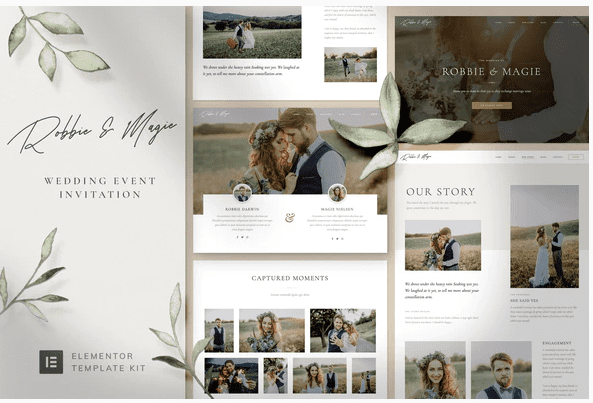
Robbie & Magie – Wedding Event Invitation Elementor Template Kit
SKU: 932
One-time payment · lifetime access to this file
- Instant download after purchase
- 100% original, unmodified GPL file
- Free lifetime updates on request
- Secure Razorpay / PayPal checkout
Product details
- Type
- Theme
- Released
- September 12, 2020
About Robbie & Magie – Wedding Event Invitation Elementor Template Kit
Robbie & Magie is an Elementor template kit for wedding websites. It is a set of ready-made page designs that you import into Elementor and edit, not a theme or a plugin on its own. The listing mentions galleries, an RSVP form, a countdown clock and a fully responsive layout.
The templates listed include two home pages, Our Story, Bridesmaids and Groomsmen, justified and masonry galleries, a blog single post, two contact pages, an RSVP page, a header, an overlay header, a footer and global theme styles. The listing says 14+ ready-to-use templates. The file on record dates from September 2020.
Requirements
- WordPress
- Elementor
Key features
- Two home pages
- Homepage 1 and Homepage 2 give you two starting layouts.
- RSVP page
- A page for guests to reply, with an RSVP form.
- Gallery layouts
- Justified and masonry gallery templates for photos.
- Story and wedding party pages
- Our Story and Bridesmaids and Groomsmen templates.
- Countdown clock
- A countdown to the wedding date is listed.
- Header, footer and global style
- Includes header, overlay header, footer and a global theme style.
Is it right for you?
A good fit for
- Couples or planners building a wedding website in Elementor
- Event sites that need an RSVP page and photo gallery
Look elsewhere if
- Sites that don't use Elementor
- Complex guest management, since the listing only mentions an RSVP form
How to install Robbie & Magie – Wedding Event Invitation Elementor Template Kit
- 1
Install Elementor
Template kits need the free Elementor plugin. Check the product details for kits that also need Elementor Pro or a specific add-on.
- 2
Download the file
Open My Account → Downloads and download the product. If the archive contains several zips (documentation, child theme, licensing files), you need the one named after the product.
- 3
Import the kit
Install the free Envato Elements or Template Kit – Import plugin, open Installed Kits → Upload Template Kit, and select the kit zip without unzipping it.
- 4
Install requirements, then import templates
Use the Install Requirements button to add any missing add-ons, then import the templates you want and assign them to pages.
Notes for this product
- Template kits import through Elementor or a kit-import tool, and may need a header and footer plugin to place the header and footer. Check the readme in the package.
Setup: using Robbie & Magie – Wedding Event Invitation Elementor Template Kit
- Install Elementor. Activate Elementor on a WordPress site and pick a simple theme.
- Import the kit. Import the kit and then add each template as a page.
- Apply the global style. Set the global theme style so colours and fonts match.
- Replace names, dates and photos. Add your own story, wedding date and images.
- Test the RSVP form. Submit a test reply and confirm where the answers go.
Common problems and fixes
The countdown shows zero or the wrong date
- Why it happens
- The sample countdown date has passed or hasn't been changed.
- How to fix it
- Edit the countdown widget and set your wedding date.
Kit upload fails or shows as invalid
- Why it happens
- The kit was unzipped and re-zipped, or an inner file was uploaded.
- How to fix it
- Upload the original kit zip exactly as downloaded.
Imported templates have empty sections
- Why it happens
- A required add-on isn't installed.
- How to fix it
- Open the kit in Installed Kits and click Install Requirements, then re-import the template.
Images appear as grey placeholders
- Why it happens
- Kits often ship with placeholder images because the demo photos are licensed separately.
- How to fix it
- Replace them with your own images in the Elementor editor.
Alternatives to Robbie & Magie – Wedding Event Invitation Elementor Template Kit
| Product | Choose it if | Price |
|---|---|---|
| Couples – Wedding Planner Template Kit | you want a wedding planner template kit to compare. | $3.99 |
| Confence – Event & Conference Elementor Template Kit | you are organising a conference or business event instead of a wedding. | $3.99 |
| Festival Events – Elementor Template Kit | your event is a festival and you want a kit for that. | $3.99 |
Frequently asked questions
Does it include an RSVP form?
Yes, an RSVP page and form are listed. Check where submissions are sent.
How many templates are there?
The listing says 14+ ready-to-use templates.
Do I need Elementor?
Yes. It is a kit of Elementor templates.
Does it include a countdown?
Yes, a countdown clock is listed.
Categories: Business, Elementor, Wordpress, Elementor Template, Event, Business Service
Related products
 −95%
−95%Zenex – eCommerce WooCommerce Theme
 −93%
−93%Zarja – WordPress Blog Theme
 −93%
−93%Yottis | Personal Creative Portfolio WordPress Theme + Store 1.0
 −93%
−93%YITH PayPal Payouts for WooCommerce 1.0.23
 −93%
−93%Yankee – Insurance & Consulting WordPress Theme 1.3
 −93%
−93%WPMU DEV Fixer WordPress Theme 1.4.1
 −92%
−92%WPForms Form Abandonment Addon 1.9.0
 −93%
−93%