
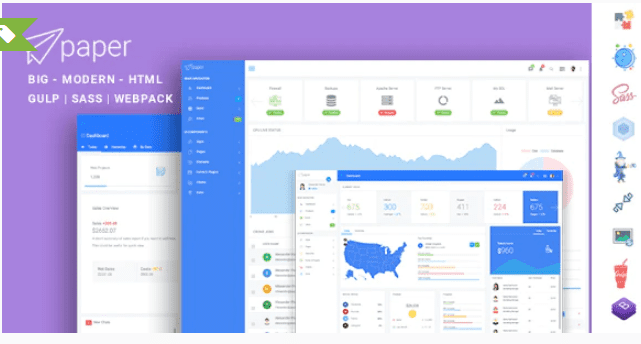
Paper Panel Multipurpose Admin Dashboard Bootstrap 4 Template
SKU: 3643
One-time payment · lifetime access to this file
- Instant download after purchase
- 100% original, unmodified GPL file
- Free lifetime updates on request
- Secure Razorpay / PayPal checkout
Product details
- Type
- Theme
- Released
- July 6, 2020
About Paper Panel Multipurpose Admin Dashboard Bootstrap 4 Template
Paper Panel is an HTML5 admin dashboard template built on Bootstrap 4. It is a front-end starting point: ready-made layout and interface pieces for an admin panel, which you then connect to your own data and back end. Most buyers who search for a paper dashboard want exactly this kind of shell.
The listing is short. It does not name the pages, charts, plugins or build tools included, and the file on record dates from July 2020. Open the package, read the documentation or demo files inside it, and check which components you get before you commit to it for a project. A static template does not run on WordPress or any back end on its own.
Requirements
- A web server or static host, or just a browser to preview it locally
- Basic HTML, CSS and JavaScript knowledge to adapt it
Key features
- Bootstrap 4 base
- The layout is built on Bootstrap 4, so standard Bootstrap grid and classes apply.
- Admin dashboard layout
- Filed as an admin template, meant for dashboards and back-office screens.
- HTML5 files
- Plain HTML, CSS and JavaScript that you can open, edit and host without a CMS.
- Customisable interface
- The interface elements can be restyled and rearranged by editing the template files.
- Multipurpose positioning
- Sold as a general-purpose panel, not tied to one industry; the listing does not state which pages are included.
Is it right for you?
A good fit for
- Developers who need a Bootstrap 4 shell for an internal tool or admin panel and will wire up the data themselves.
- Small projects and prototypes that need a ready-made dashboard look quickly.
Look elsewhere if
- Anyone who wants a working app with login, database and users out of the box; this is a front-end template only.
- Projects built on Bootstrap 5 or a framework such as React or Vue, since the listing describes Bootstrap 4 HTML.
How to install Paper Panel Multipurpose Admin Dashboard Bootstrap 4 Template
- 1
Download the file
Open My Account → Downloads and download the product. If the archive contains several zips (documentation, child theme, licensing files), you need the one named after the product.
- 2
Pick a version
Admin templates often ship several builds (plain HTML, React, Angular, Laravel). Start from the folder that matches your stack.
- 3
Install dependencies
For framework builds, run npm install (or the command in the docs) and start the development server described in the README.
Notes for this product
- This is an HTML template, not a WordPress theme or plugin. Do not upload it in the WordPress admin.
Setup: using Paper Panel Multipurpose Admin Dashboard Bootstrap 4 Template
- Unzip the package. Extract it and look for the documentation or a readme and the demo folder.
- Preview locally. Open the main dashboard HTML file in a browser to see the layout.
- Check the folder structure. Find the CSS, JavaScript and asset folders so you know what to edit and what to keep.
- Copy the layout into your project. Reuse the page shell (sidebar, header, content area) in your own app or back-end views.
- Restyle and trim. Change colours and branding, then delete components and scripts you do not use.
Common problems and fixes
Icons, fonts or charts are missing when you open the page
- Why it happens
- Templates often load assets from relative paths or a CDN, which break if you move files or work offline.
- How to fix it
- Keep the original folder structure, and check the browser console for blocked or 404 files.
Alternatives to Paper Panel Multipurpose Admin Dashboard Bootstrap 4 Template
| Product | Choose it if | Price |
|---|---|---|
| Slim – Modern & Clean Responsive Bootstrap 4 Admin Dashboard Template | you want another clean Bootstrap 4 admin dashboard to compare layouts. | $3.99 |
| Syntra – Responsive Bootstrap 4 Admin Dashboard | you want a responsive Bootstrap 4 dashboard with a different visual style. | $3.99 |
| Fonik – Responsive Bootstrap 4 Admin Dashboard | you want a further Bootstrap 4 admin option to compare before you pick one. | $3.99 |
Frequently asked questions
Does it work with WordPress?
No. It is an HTML admin template, not a WordPress theme or plugin. You can use it in a custom back end or app.
Which Bootstrap version does it use?
Bootstrap 4, according to the product name.
Which pages and charts are included?
The listing does not say. Check the demo and documentation inside the package.
Can I use it in a Laravel or PHP project?
Yes, in principle: it is HTML, CSS and JavaScript that you can split into your own views. The listing does not mention a framework version of it.
Categories: HTML5, Admin Template
Related products
 −77%
−77%Zakas – Fashion HTML Template
 −81%
−81%Satisfyc – Satisfaction Survey Form Wizard
 −67%
−67%Quirk Bootstrap Admin Template
 −79%
−79%LogiTrans – Logistic and Transportation HTML Template
 −75%
−75%Lion – One Page & Multipurpose HTML Theme
 −78%
−78%Kuponhub | Affiliate Coupons and Discounts
 −77%
−77%Hurst – Furniture Store eCommerce HTML Template
 −77%
−77%