
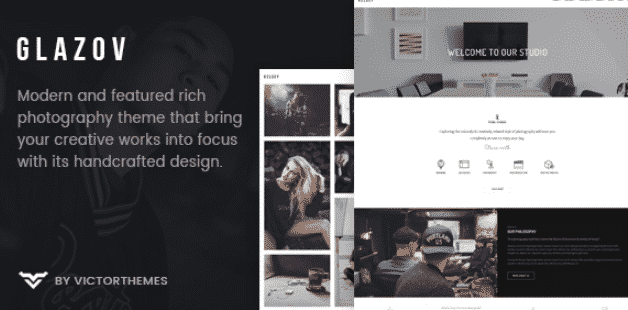
Glazov – Photography WordPress Theme
Version 1.0
SKU: 9872
One-time payment · lifetime access to this file
- Instant download after purchase
- 100% original, unmodified GPL file
- Free lifetime updates on request
- Secure Razorpay / PayPal checkout
Product details
- Version on file
- 1.0
- Marketplace
- Themeforest
- Type
- Theme
- Released
- October 13, 2018
- License
- GPL
- Live demo
- View the developer's demo
About Glazov – Photography WordPress Theme 1.0
Glazov is a WordPress theme made for photographers. The name states its purpose: a site that puts photo work first. In the store it is filed under multipurpose and premium theme categories, and the file on record is version 1.0.
The listing doesn't describe gallery types, lightbox, or demos, so check the documentation in the package. The file dates from October 2018. Test it with your current WordPress and PHP versions on a staging site before building a client portfolio on it.
Key features
- Photography focus
- Designed for photographers' portfolio sites, per its name.
- Multipurpose filing
- Also listed under multipurpose, so it can carry about and contact pages.
- Standard theme install
- Installs as a normal WordPress theme.
- Documentation in the package
- The listing gives no feature list, so the included documentation is the source of truth.
Is it right for you?
A good fit for
- Photographers who want a portfolio site
- Creatives who want images to be the main content
Look elsewhere if
- Online print shops, since the listing doesn't mention a store
- Text-heavy blogs or business sites
How to install Glazov – Photography WordPress Theme 1.0
- 1
Download the file
Open My Account → Downloads and download the product. If the archive contains several zips (documentation, child theme, licensing files), you need the one named after the product.
- 2
Find the installable theme zip
Theme packages often bundle the theme, a child theme, plugins and docs. The installable theme is the zip that has style.css at its top level.
- 3
Upload it to WordPress
Go to Appearance → Themes → Add New Theme → Upload Theme, choose the theme zip, then Install Now and Activate.
- 4
Install the recommended plugins
Most premium themes show a notice listing their required plugins. Install those before importing any demo content.
Notes for this product
- The listing doesn't name bundled plugins. Check for a required-plugins notice after activation.
Getting started: using Glazov – Photography WordPress Theme 1.0
- Activate on a staging site. Activate Glazov and install any plugins it asks for.
- Read the documentation. See which gallery and portfolio layouts the package provides.
- Upload a test gallery. Add a few optimised photos and check how they display.
- Check speed and mobile view. Large photos slow pages, so test loading time and the phone layout.
Common problems and fixes
Gallery pages load slowly
- Why it happens
- Full-size camera files were uploaded.
- How to fix it
- Resize and compress images before upload, and use a caching plugin.
“The package could not be installed. The theme is missing the style.css stylesheet.”
- Why it happens
- The full download package was uploaded instead of the theme zip inside it.
- How to fix it
- Unzip the package and upload the zip that contains style.css at its top level.
“The link you followed has expired.” when uploading
- Why it happens
- The zip is larger than your server's PHP upload limit (upload_max_filesize / post_max_size).
- How to fix it
- Raise the upload limit in your hosting control panel, or unzip the file and upload the folder to wp-content/themes with your host's file manager or SFTP.
Demo import stops part-way or times out
- Why it happens
- The server hits its execution-time or memory limit during the import.
- How to fix it
- Raise max_execution_time and memory_limit with your host, then re-run the importer; importing content, widgets and settings separately also helps.
Pages look broken right after activating
- Why it happens
- The theme's required plugins (page builder, theme core plugin) aren't installed yet.
- How to fix it
- Install and activate everything in the theme's required-plugins notice, then reload.
Alternatives to Glazov – Photography WordPress Theme 1.0
| Product | Choose it if | Price |
|---|---|---|
| Opta Minimal Portfolio and Photography Theme 1.5 | you want a minimal portfolio design that also covers photography. | $4.25 |
| Umbrella – Photography WordPress Theme 2.1.0 | you want another dedicated photography theme to compare. | $4.25 |
Frequently asked questions
Is Glazov only for photographers?
It is named and described as a photography theme, though it is also filed under multipurpose.
Does it include demo content?
The listing doesn't say. Check the documentation in the package.
Will it work with current WordPress?
The file dates from October 2018, so test it on a staging copy first.
Categories: Multi-Purpose, Premium Theme, Wordpress, WordPress Premium Themes
Related products
 −94%
−94%Zyra – The Clean, Minimal Shopify Theme
 −93%
−93%Zarja – WordPress Blog Theme
 −93%
−93%Yottis | Personal Creative Portfolio WordPress Theme + Store 1.0
 −93%
−93%YITH PayPal Payouts for WooCommerce 1.0.23
 −93%
−93%Yankee – Insurance & Consulting WordPress Theme 1.3
 −93%
−93%WPMU DEV Fixer WordPress Theme 1.4.1
 −92%
−92%WPForms Form Abandonment Addon 1.9.0
 −93%
−93%