
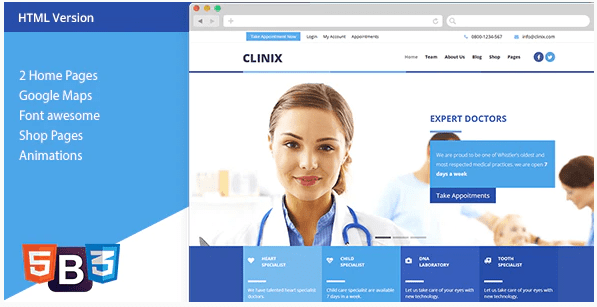
CLINIX – Medical HTML Template
SKU: 2717
One-time payment · lifetime access to this file
- Instant download after purchase
- 100% original, unmodified GPL file
- Free lifetime updates on request
- Secure Razorpay / PayPal checkout
Product details
- Type
- Theme
- Released
- May 13, 2020
About CLINIX – Medical HTML Template
CLINIX is a static HTML template for medical and health websites. It was originally sold on ThemeForest, and the file on record is from May 2020. In the store it is filed under responsive, HTML5, care, health, booking, children and hospital, so it is aimed at clinics, small hospitals and care providers.
It is plain HTML, CSS and scripts, not a WordPress theme or a CMS. You edit the files, then upload the site to any web host. The listing doesn't state how many pages it includes or whether the contact or booking forms have a working back end, so check the documentation in the package.
Key features
- Medical and health design
- Built for clinics, hospitals and care services, with children's care also among its categories.
- Responsive HTML5
- Listed as responsive and HTML5, so pages adapt to tablets and phones.
- Plain files you can edit
- No CMS or database is needed; you change text and images directly in the HTML.
- Booking-style layout
- Filed under booking, which suggests appointment sections; check which pages include them.
Is it right for you?
A good fit for
- Clinics and small practices that want a simple, fast static website
- Designers who prefer editing plain HTML to configuring a CMS theme
Look elsewhere if
- Sites that need a CMS where staff edit pages without touching code
- Anyone expecting built-in online appointment management, which the listing doesn't state
How to install CLINIX – Medical HTML Template
- 1
Download the file
Open My Account → Downloads and download the product. If the archive contains several zips (documentation, child theme, licensing files), you need the one named after the product.
- 2
Preview and edit
Unzip the template and open the HTML files in a code editor. Text lives in the .html files; colours and fonts are in the CSS.
- 3
Upload to your host
Upload the template folder's contents to your site's public folder (often public_html) with your host's file manager or SFTP, keeping the folder structure intact.
Setup: using CLINIX – Medical HTML Template
- Open the package and read the docs. Unzip it, find the documentation and the main index file, and check the folder layout.
- Preview locally. Open the pages in a browser or a local server to see every page and layout.
- Replace text, images and contact details. Edit the HTML to add your clinic name, services, doctors, photos and address.
- Connect the forms. Point any contact or booking form at a form handler or service you control.
- Upload to your host. Upload the finished files to your web host and test every page on a phone.
Common problems and fixes
The contact form doesn't send
- Why it happens
- Static templates need a server-side script or a form service to deliver mail.
- How to fix it
- Configure the template's mail script with your address on a host that supports PHP mail or SMTP, or connect a form service.
Sliders, fonts or maps don't work when opening index.html directly
- Why it happens
- Browsers block some scripts on file:// pages.
- How to fix it
- Preview through a local server (for example VS Code Live Server) or after uploading to your host.
Alternatives to CLINIX – Medical HTML Template
| Product | Choose it if | Price |
|---|---|---|
| Doctor – Medical & Health HTML Template | you want another static HTML template for doctors and health sites to compare. | $3.99 |
| MedicalPRO – Health and Medical HTML Template | you want a second medical HTML template with a different layout. | $3.99 |
| Health Care – Doctor Hospital Clinic Medical Responsive Website Template | you want a template aimed at hospitals and clinics with a wider range of page types. | $3.99 |
Frequently asked questions
Is CLINIX a WordPress theme?
No. It is a static HTML template. To use it on WordPress you would need to convert it to a theme.
Does the booking form work out of the box?
The listing doesn't say. A static template usually needs a form handler or a third-party service to send messages.
How many pages are included?
The listing doesn't state it. Open the package and check the HTML files.
Do I need to know code?
Basic HTML helps, because you edit the files directly to change text and images.
Categories: Responsive, HTML5, Care, Health, Booking, Children, Hospital, Business Service
Related products
 −95%
−95%Zenex – eCommerce WooCommerce Theme
 −93%
−93%Zarja – WordPress Blog Theme
 −77%
−77%Zakas – Fashion HTML Template
 −93%
−93%Yottis | Personal Creative Portfolio WordPress Theme + Store 1.0
 −93%
−93%YITH PayPal Payouts for WooCommerce 1.0.23
 −93%
−93%Yankee – Insurance & Consulting WordPress Theme 1.3
 −92%
−92%WPForms Form Abandonment Addon 1.9.0
 −93%
−93%