
WooCommerce Memberships
Version 1.22.11
SKU: 571
One-time payment · lifetime access to this file
- Instant download after purchase
- 100% original, unmodified GPL file
- Free lifetime updates on request
- Secure Razorpay / PayPal checkout
Product details
- Version on file
- 1.22.11
- Type
- plugin
- Released
- 19-02-2022
- File size
- 1.28 MB
- License
- GPL
About WooCommerce Memberships 1.22.11
WooCommerce Memberships adds membership plans and content restrictions to a WooCommerce store. You create plans, decide what each plan gives access to, and restricted content then opens only for registered members who hold the right plan. It's a way to run a members-only area, or a membership business, on the same site as your shop.
Because it's built on WooCommerce, plans are linked to your products. A customer buys a product and the plan is granted, so checkout, payment gateways, coupons and tax all work as they do for the rest of your store. Restricted content can include pages, posts and products, and plans can be free to join or paid.
The plans themselves don't repeat charges. For memberships that renew on a schedule, merchants normally pair it with WooCommerce Subscriptions. It is the right tool if you already run WooCommerce; a membership plugin that has its own payment handling may suit a site that isn't selling products.
Requirements
- WooCommerce
Key features
- Membership plans
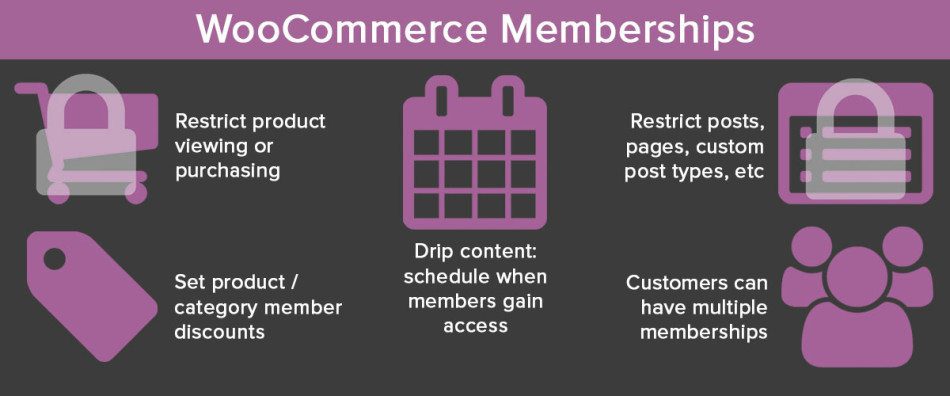
- Create plans that members join for free or by purchasing a product.
- Content restriction
- Limit access to posts, pages and other content to registered members of a plan.
- Product access rules
- Restrict who can view or buy certain products by membership.
- Members-only discounts
- Offer prices that apply only to people on a plan.
- Works through WooCommerce
- Plans are granted through ordinary WooCommerce orders, with your usual gateways, coupons and tax.
- Member management
- See your members and their plans in the dashboard, and manage them there.
Is it right for you?
A good fit for
- WooCommerce shops adding a members-only area or paid membership
- Stores that want member discounts on products
- Businesses that already take payments through WooCommerce
Look elsewhere if
- Sites that don't run WooCommerce, where a standalone membership plugin is simpler
- Anyone who wants renewing memberships without adding WooCommerce Subscriptions
How to install WooCommerce Memberships 1.22.11
- 1
Download the file
Open My Account → Downloads and download the product. If the archive contains several zips (documentation, child theme, licensing files), you need the one named after the product.
- 2
Upload it to WordPress
In your dashboard go to Plugins → Add New Plugin → Upload Plugin and choose the zip.
- 3
Install and activate
Click Install Now, then Activate. If an older or free copy is already installed, WordPress offers to replace it with the uploaded version.
Notes for this product
- For memberships that renew automatically, you'd normally add WooCommerce Subscriptions as well. This plugin supplies the plans and restrictions.
Setup: using WooCommerce Memberships 1.22.11
- Create a membership plan. Open the plans area under WooCommerce and add a plan with a name and the content it unlocks.
- Choose how people join. Link the plan to a WooCommerce product, so buying it grants membership, or allow free sign-up.
- Restrict content. Set the posts, pages or products that only members of the plan should see.
- Decide what non-members see. Choose whether restricted content is hidden entirely or shows a teaser and a message about joining.
- Test a purchase. Buy the plan's product with a test account and confirm the restricted content opens.
- Add a members area link. Link to the account area where members can see their plans, from your menu.
Common problems and fixes
A customer paid but didn't get membership
- Why it happens
- The order hasn't reached the status that grants membership, usually Completed.
- How to fix it
- Tick Virtual on the plan's product so paid orders complete automatically, or mark the order Completed by hand.
Non-members can still see restricted content
- Why it happens
- A page cache is serving the restricted page, or the content isn't covered by the plan's rules.
- How to fix it
- Exclude restricted pages from page caching, check the plan's rules, and test in a private window.
Members see a login or join message on pages they should reach
- Why it happens
- They aren't logged in, or their plan has expired or been cancelled.
- How to fix it
- Check the member's status in the dashboard, and confirm they're logged in with the account that holds the plan.
“The link you followed has expired.” when uploading
- Why it happens
- The zip is larger than your server's PHP upload limit (upload_max_filesize / post_max_size).
- How to fix it
- Raise the upload limit in your hosting control panel, or unzip the file and upload the folder to wp-content/plugins with your host's file manager or SFTP.
“The package could not be installed. No valid plugins were found.”
- Why it happens
- The uploaded zip is a bundle (or a theme), not the plugin itself.
- How to fix it
- Unzip the download once and upload the inner zip named after the plugin.
“Plugin could not be activated because it triggered a fatal error.”
- Why it happens
- Usually a PHP version older than the plugin needs, or a second copy of the same plugin (for example the free version) still active.
- How to fix it
- Check your PHP version under Tools → Site Health → Info, deactivate any other copy of the plugin, and enable WP_DEBUG_LOG to see the exact error.
Licence or “updates unavailable” notices
- Why it happens
- The developer's licence key isn't included. Features that call the developer's servers (template libraries, cloud APIs, automatic updates) need it.
- How to fix it
- Everything that runs locally works without it. For a newer file, use Request an update from your account.
Alternatives to WooCommerce Memberships 1.22.11
| Product | Choose it if | Price |
|---|---|---|
| MemberPress WordPress Plugin 1.11.22 | you want a membership plugin with its own payment handling, instead of one built on WooCommerce orders. | $5.45 |
| YITH WooCommerce Membership Premium 2.8.0 | you want another membership plugin built on WooCommerce to compare. | $5.10 |
Frequently asked questions
Does it need WooCommerce?
Yes. Plans are granted through WooCommerce orders, so the store has to run on it.
Can I sell recurring memberships?
Pair it with WooCommerce Subscriptions for renewing payments. The plugin itself supplies the plans and restrictions.
What can I restrict?
Posts, pages and products can be limited to members of a plan.
Can plans be free?
Yes. A plan can be free to join, or granted when someone buys a product.
Can I offer member-only prices?
Yes. You can set discounts that apply only to members of a plan.
Categories: Membership, WooCommerce, woocommerce plugin, E-commerce plugin
Related products
 −95%
−95%Zenex – eCommerce WooCommerce Theme
 −93%
−93%YITH WooCommerce Quick Checkout for Digital Goods Premium 1.26.0
 −93%
−93%YITH WooCommerce Order Tracking Premium 2.14.0
 −93%
−93%YITH PayPal Payouts for WooCommerce 1.0.23
 −84%
−84%WooZone Amazon Contextual Recommendations Plugin 1.3
 −93%
−93%WooThemes Live Wire Premium Theme 2.5.2
 −85%
−85%WooSlider Products Slideshow 1.0.23
 −97%
−97%