
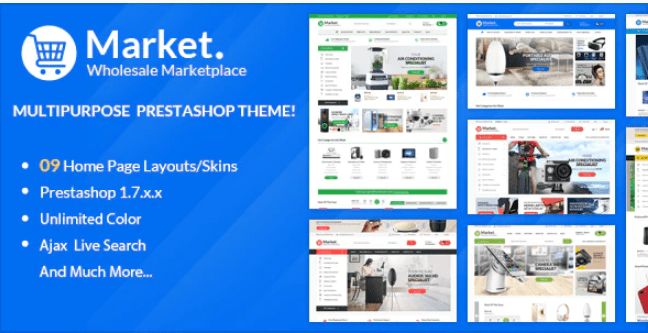
Themes Market Responsive Prestashop
Version 1.7
SKU: 6888
One-time payment · lifetime access to this file
- Instant download after purchase
- 100% original, unmodified GPL file
- Free lifetime updates on request
- Secure Razorpay / PayPal checkout
Product details
- Marketplace
- Themeforest
- Type
- Theme
- Released
- May 1, 2020
- License
- GPL
- Live demo
- View the developer's demo
About Themes Market Responsive Prestashop 1.7
Themes Market is a responsive theme for PrestaShop 1.7, originally sold on ThemeForest. It is a multipurpose design, which means the layout isn't tied to one kind of product. In the store it is filed under electronics, kids, and fashion and beauty shops, among other uses.
Like any PrestaShop theme, it changes how your storefront looks: the header, home page, category listings, product pages and the styling of the checkout. Your products, orders and settings stay in PrestaShop. The theme comes in PrestaShop's theme package format, so you install it from Design, Theme & Logo in the back office.
Match versions before you install. This theme is built for PrestaShop 1.7. A store on PrestaShop 8 or later needs a theme that supports it, so try the theme on a test copy of your shop before changing the live store.
Requirements
- PrestaShop 1.7
Key features
- Responsive layout
- The storefront adapts to desktop, tablet and phone screen sizes.
- Built for PrestaShop 1.7
- Made for the 1.7 series of PrestaShop and its theme system.
- Multipurpose design
- A general-purpose layout that isn't limited to one product type, so you can adapt it to your catalogue.
- Suits several store types
- Listed for electronics, kids, and fashion and beauty shops.
- Standard theme package
- Installs through PrestaShop's own theme importer, like other 1.7 themes.
- Adjustable with PrestaShop's tools
- Use the back office's theme, positions and module settings to arrange the storefront.
Is it right for you?
A good fit for
- New PrestaShop 1.7 stores that want a ready-made, general-purpose design
- Shops selling electronics, children's items, or fashion and beauty products
- Developers who want a base theme to adapt for a client
Look elsewhere if
- Stores on PrestaShop 1.6, or on PrestaShop 8 and later, unless you've confirmed the theme works on your version
- Shops that want a design built around a single product, where a single-product theme is a better fit
- Sites that don't run on PrestaShop
How to install Themes Market Responsive Prestashop 1.7
- 1
Download the file
Open My Account → Downloads and download the product. If the archive contains several zips (documentation, child theme, licensing files), you need the one named after the product.
- 2
Check the platform version
Compare the version the theme was built for (see the product details or the theme's docs) with your store's version before installing.
- 3
Install with your platform's theme installer
PrestaShop: Design → Theme & Logo → Add new theme. OpenCart: Extensions → Installer. Joomla: System → Install → Extensions. Magento 2 themes are usually copied into app/design and enabled from the command line, as the theme's docs describe.
Setup: using Themes Market Responsive Prestashop 1.7
- Back up and test on a copy. Make a backup of your shop and the database, and try the theme on a copy first.
- Install the theme. In the back office go to Design, Theme & Logo, choose Add new theme, and upload the theme zip.
- Activate it. Once imported, use the theme's Use this theme button to make it the live storefront.
- Set your logo and key modules. Add your logo and review the modules and positions that fill the header, home page and footer.
- Add categories and products. Create your catalogue, then check that the home page sections show your products rather than empty areas.
- Test on a phone and at checkout. Walk through browsing, adding to the cart and checkout on a phone and a desktop browser.
Common problems and fixes
The home page looks empty compared with the theme's demo
- Why it happens
- A theme's files contain its layout and settings, not the demo's products, images and banners.
- How to fix it
- Add your own categories, products and banners, then configure the home page modules to display them.
Product images look stretched or cropped
- Why it happens
- The theme uses different image sizes from your previous theme, and existing thumbnails weren't regenerated.
- How to fix it
- In the back office open Design, Image Settings, and regenerate thumbnails.
The theme upload is rejected
- Why it happens
- The file exceeds the server's upload limit, or it's a bundle rather than the theme package.
- How to fix it
- Upload the inner theme package, or raise the limit / upload via FTP as the theme docs describe.
Changes don't appear on the storefront
- Why it happens
- The platform's cache is serving old templates.
- How to fix it
- Clear the cache from the platform's performance or cache settings.
Alternatives to Themes Market Responsive Prestashop 1.7
| Product | Choose it if | Price |
|---|---|---|
| Devita – Multipurpose Responsive PrestaShop Theme | you want another multipurpose PrestaShop theme to compare layouts before choosing. | $4.25 |
| Zonan – Health & Beauty Responsive Prestashop Theme | your shop sells health and beauty products and you want a design aimed at them. | $3.99 |
| Elomus – Single Product Prestashop Theme | you sell one product, or a very small range, and want the design built around it. | $4.59 |
Frequently asked questions
Does it work on PrestaShop 1.6?
It is built for PrestaShop 1.7, so a 1.6 store needs a theme made for that version.
Will it work on PrestaShop 8?
It isn't built for it. Test on a copy of your shop, and use a theme that supports your version if the copy breaks.
Is it only for one type of store?
No. It's a multipurpose theme, and in the store it is listed for electronics, kids, and fashion and beauty shops.
Does it include demo products?
A theme's files carry the design, not your catalogue. Expect to add your own products and banners.
Can I change the colours and layout?
You can arrange modules and positions in the back office and add custom CSS. Options beyond that depend on what the theme itself provides.
Categories: eCommerce, Multi-Purpose, ecommerce theme, Responsive, Electronic, KIds, PrestaShop, Fashion Beauty
Related products
 −94%
−94%Zyra – The Clean, Minimal Shopify Theme
 −95%
−95%Zenex – eCommerce WooCommerce Theme
 −93%
−93%Zarja – WordPress Blog Theme
 −77%
−77%Zakas – Fashion HTML Template
 −93%
−93%Yottis | Personal Creative Portfolio WordPress Theme + Store 1.0
 −92%
−92%WPForms Form Abandonment Addon 1.9.0
 −93%
−93%WooThemes SMPL Premium Theme 1.4.5
 −93%
−93%