
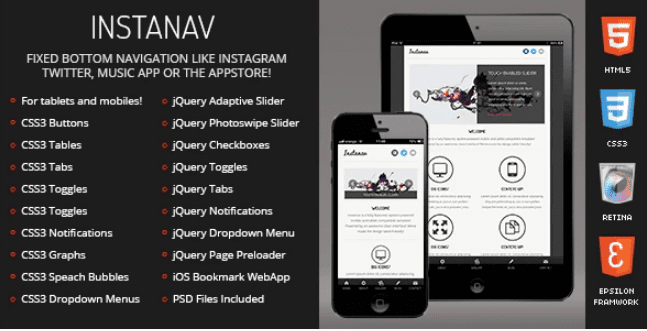
Instanav Mobile
SKU: 1597
One-time payment · lifetime access to this file
- Instant download after purchase
- 100% original, unmodified GPL file
- Free lifetime updates on request
- Secure Razorpay / PayPal checkout
Product details
- Type
- Theme
- Released
- June 26, 2020
About Instanav Mobile
Instanav Mobile is a static HTML5 template designed for phone screens first. You get the page files, styles and scripts, and you change the text, images and colours yourself. There is no CMS, database or page builder involved.
That suits a compact site: a personal page, a small business site or a simple project page that needs to load quickly on mobile connections. Because it is plain HTML, it runs on any web host, including static hosting, and you keep full control of the markup.
The trade-off is that every change is a code edit. If you or a client want to update content from a dashboard, a WordPress theme will be easier to live with. If you want a lean site you control line by line, a template like this is the shorter route.
Key features
- Mobile-first layout
- Built for small screens first, so navigation and content are laid out for touch from the start.
- Plain HTML5 and CSS
- Edit pages in any code editor; there is no CMS, database or plugin system to maintain.
- Customisable components
- Change the text, images and colours of the included interface components to match your brand.
- Lightweight files
- A compact set of files keeps pages quick to load on mobile data.
- Runs on any host
- Upload the files to shared hosting or a static host; nothing needs to run on the server.
- Usable as it is
- Publish it with your own content as-is, or use it as the starting point for a custom design.
Is it right for you?
A good fit for
- Personal sites and simple blogs that don't need a CMS
- Small businesses that want a quick, phone-friendly presence
- Developers who want a mobile-first starting point to build on
Look elsewhere if
- Anyone who needs to edit content without touching code
- Online shops that need a cart, checkout or product catalogue
- Sites that need search, user accounts or other server-side features
How to install Instanav Mobile
- 1
Download the file
Open My Account → Downloads and download the product. If the archive contains several zips (documentation, child theme, licensing files), you need the one named after the product.
- 2
Preview and edit
Unzip the template and open the HTML files in a code editor. Text lives in the .html files; colours and fonts are in the CSS.
- 3
Upload to your host
Upload the template folder's contents to your site's public folder (often public_html) with your host's file manager or SFTP, keeping the folder structure intact.
Setup: using Instanav Mobile
- Open the template in an editor. Unzip the download and open the folder containing the HTML pages in a code editor such as VS Code.
- Preview it locally. Open the main HTML page in a browser, or use a local server extension so every script behaves as it will online.
- Replace the content. Swap the placeholder text, links and images in the HTML files for your own, keeping file names and folder structure intact.
- Adjust colours and fonts. Change the colour and typography values in the CSS files so the template matches your brand.
- Test on a real phone. Check every page on an actual phone as well as a desktop browser before you publish, paying attention to menus and tap targets.
Common problems and fixes
The contact form doesn't send
- Why it happens
- Static templates need a server-side script or a form service to deliver mail.
- How to fix it
- Configure the template's mail script with your address on a host that supports PHP mail or SMTP, or connect a form service.
Sliders, fonts or maps don't work when opening index.html directly
- Why it happens
- Browsers block some scripts on file:// pages.
- How to fix it
- Preview through a local server (for example VS Code Live Server) or after uploading to your host.
Alternatives to Instanav Mobile
| Product | Choose it if | Price |
|---|---|---|
| M-PLAY – Mobile Video Template | your site is built around video and you want a mobile template designed for showing it. | $3.99 |
| BRIX – Mobile App landing page HTML Template | you're promoting a mobile app and want a single landing-page layout rather than a small multi-page site. | $3.99 |
Frequently asked questions
Is Instanav Mobile a WordPress theme?
No. It is a static HTML5 template. You edit the files directly and upload them to a web host; there is no WordPress dashboard.
Do I need to know HTML to use it?
Basic HTML and CSS are enough. You'll be replacing text and images in the page files and changing colours in the stylesheet.
Will it look right on desktop screens?
It is designed mobile-first and listed as responsive, so it adapts to wider screens. Preview it at desktop width before launch if most of your visitors use computers.
Can I add a contact form?
Yes, but a static template can't send email by itself. Connect the form to a mail script on a host that supports it, or to a form service.
Categories: Mobile, Responsive, HTML5, Android
Related products
 −77%
−77%Zakas – Fashion HTML Template
 −93%
−93%Volga – MegaShop Responsive Prestashop 1.7 Theme
 −70%
−70%Undo Redo for WPBakery Page Builder 1.2.5
 −83%
−83%UberSlider Layer Slider WordPress Plugin 1.8.2.2
 −93%
−93%The Grid – Responsive WordPress Grid Plugin 2.7.3
 −90%
−90%Sofee | Cosmetic Skincare Shopify Theme
 −92%
−92%SmartMag – Responsive & Retina WordPress Magazine 7.1.1
 −92%
−92%