
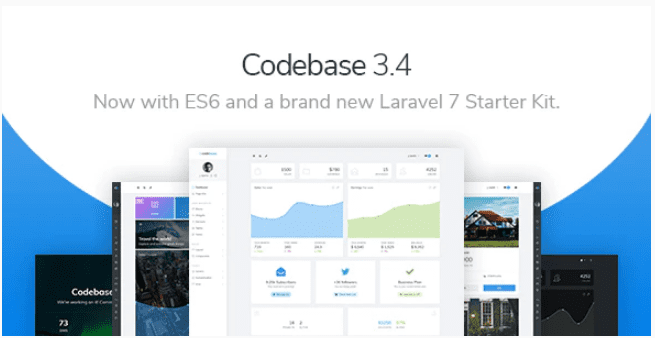
Codebase – Bootstrap 4 Admin Dashboard Template & Laravel 7 Starter Kit
SKU: 3724
One-time payment · lifetime access to this file
- Instant download after purchase
- 100% original, unmodified GPL file
- Free lifetime updates on request
- Secure Razorpay / PayPal checkout
Product details
- Type
- Theme
- Released
- July 6, 2020
About Codebase – Bootstrap 4 Admin Dashboard Template & Laravel 7 Starter Kit
Codebase is an admin dashboard template built on Bootstrap 4. The title also names a Laravel 7 starter kit, so the package is meant for both plain HTML use and a Laravel project. It is not a WordPress theme. It supplies the front-end of an admin area that you connect to your own back end.
The listing doesn't state the page list, the chart library or how the Laravel kit is organised. Check the documentation in the package. The file dates from July 2020, so a Laravel 7 project means an older PHP and Laravel environment. Plan for that.
Requirements
- A web server or Laravel environment (for the starter kit)
- Node tooling, if the documentation uses it to build assets
Key features
- Bootstrap 4 base
- Built on Bootstrap 4, so you can reuse the grid and components you already know.
- Laravel 7 starter kit
- The title says the package includes a starter kit for Laravel 7.
- Admin dashboard layout
- Filed as an admin template for panels and back-office screens.
- Responsive and HTML5
- Listed as responsive HTML5, so the panel adapts to tablets and phones.
Is it right for you?
A good fit for
- Laravel developers who want a ready admin layout to start from
- Teams building a back-office panel on Bootstrap 4
Look elsewhere if
- Non-developers, since you need to connect data, logins and logic yourself
- Projects on current Laravel versions, because the starter kit targets Laravel 7
How to install Codebase – Bootstrap 4 Admin Dashboard Template & Laravel 7 Starter Kit
- 1
Download the file
Open My Account → Downloads and download the product. If the archive contains several zips (documentation, child theme, licensing files), you need the one named after the product.
- 2
Pick a version
Admin templates often ship several builds (plain HTML, React, Angular, Laravel). Start from the folder that matches your stack.
- 3
Install dependencies
For framework builds, run npm install (or the command in the docs) and start the development server described in the README.
Notes for this product
- The listing doesn't say how the HTML version and the Laravel kit are laid out in the package. Read the documentation to find which folder to use for your project.
Setup: using Codebase – Bootstrap 4 Admin Dashboard Template & Laravel 7 Starter Kit
- Choose HTML or Laravel. Decide whether you need the static HTML files or the Laravel 7 starter kit.
- Follow the install instructions. For the Laravel kit, follow the documentation for installing dependencies and building assets.
- Open the demo pages. Run the project locally and browse the included layouts.
- Replace sample data. Connect your own routes, data and login, then restyle the sidebar and navigation.
Alternatives to Codebase – Bootstrap 4 Admin Dashboard Template & Laravel 7 Starter Kit
| Product | Choose it if | Price |
|---|---|---|
| Metrica – Laravel Admin & Dashboard Template | you want another admin template that is built with Laravel in mind. | $3.99 |
| Lexa – Bootstrap 4, React, Laravel, Ajax & PHP Admin Dashboard Template | you want a Bootstrap 4 admin template that also lists React and PHP versions. | $3.99 |
| Slim – Modern & Clean Responsive Bootstrap 4 Admin Dashboard Template | you want a lighter, cleaner Bootstrap 4 admin design to compare. | $3.99 |
Frequently asked questions
Is Codebase a WordPress theme?
No. It is an admin dashboard template for HTML and Laravel projects.
Does it work with newer Laravel versions?
The kit is named for Laravel 7. You may need to adapt it for newer versions.
Does it include a database or login?
The listing doesn't say so. Treat it as a front-end layout and build the logic yourself.
Categories: Responsive, HTML5, Admin Template
Related products
 −77%
−77%Zakas – Fashion HTML Template
 −93%
−93%Volga – MegaShop Responsive Prestashop 1.7 Theme
 −70%
−70%Undo Redo for WPBakery Page Builder 1.2.5
 −83%
−83%UberSlider Layer Slider WordPress Plugin 1.8.2.2
 −93%
−93%The Grid – Responsive WordPress Grid Plugin 2.7.3
 −90%
−90%Sofee | Cosmetic Skincare Shopify Theme
 −92%
−92%SmartMag – Responsive & Retina WordPress Magazine 7.1.1
 −92%
−92%