
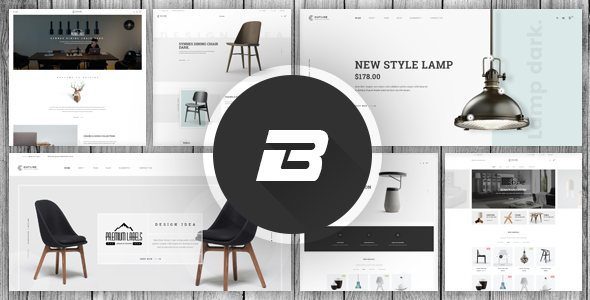
Benco Responsive Furniture WooCommerce WordPress 1.2.7
SKU: 9167
One-time payment · lifetime access to this file
- Instant download after purchase
- 100% original, unmodified GPL file
- Free lifetime updates on request
- Secure Razorpay / PayPal checkout
Product details
- Version on file
- 1.2.4
- Marketplace
- Themeforest
- Type
- Theme
- Released
- April 16, 2018
- License
- GPL
- Live demo
- View the developer's demo
About Benco Responsive Furniture WooCommerce WordPress 1.2.7
Benco is a WordPress theme, not a plugin, even though the store labels it a plugin. The title and categories (ecommerce theme, Themes, Responsive, Multi-Purpose) describe a responsive furniture-shop design for WooCommerce. Install it from Appearance > Themes.
The title says 1.2.7, but the file on record is version 1.2.4 from April 2018. Use the file's number. A theme this old may clash with current WordPress, PHP and WooCommerce, so test it on a staging site, including cart and checkout. The listing doesn't state demos, page templates or required plugins, so read the documentation in the package.
Requirements
- WooCommerce
Key features
- Furniture-shop design
- Named for furniture and WooCommerce stores.
- Responsive layout
- Listed as responsive.
- Multi-purpose tags
- Also tagged Multi-Purpose, Agency, Company and Blog News Magazine.
- Details left to the docs
- The listing doesn't state demos or bundled plugins.
Is it right for you?
A good fit for
- Small furniture or home-decor shops on WooCommerce
- Developers who will test and adjust an older theme
Look elsewhere if
- Sites without WooCommerce
- Stores that need current-WooCommerce compatibility confirmed
How to install Benco Responsive Furniture WooCommerce WordPress 1.2.7
- 1
Download the file
Open My Account → Downloads and download the product. If the archive contains several zips (documentation, child theme, licensing files), you need the one named after the product.
- 2
Find the installable theme zip
Theme packages often bundle the theme, a child theme, plugins and docs. The installable theme is the zip that has style.css at its top level.
- 3
Upload it to WordPress
Go to Appearance → Themes → Add New Theme → Upload Theme, choose the theme zip, then Install Now and Activate.
- 4
Install the recommended plugins
Most premium themes show a notice listing their required plugins. Install those before importing any demo content.
Notes for this product
- If a required-plugins notice appears after activation, install those plugins before importing demo content.
Getting started: using Benco Responsive Furniture WooCommerce WordPress 1.2.7
- Install WooCommerce and the theme. Activate the theme on a staging site.
- Read the documentation. Check which plugins and demos come with it.
- Add categories and products. Set up your furniture catalogue and check shop and product pages.
- Test checkout. Run a test order with your payment gateway before launch.
Common problems and fixes
“The package could not be installed. The theme is missing the style.css stylesheet.”
- Why it happens
- The full download package was uploaded instead of the theme zip inside it.
- How to fix it
- Unzip the package and upload the zip that contains style.css at its top level.
“The link you followed has expired.” when uploading
- Why it happens
- The zip is larger than your server's PHP upload limit (upload_max_filesize / post_max_size).
- How to fix it
- Raise the upload limit in your hosting control panel, or unzip the file and upload the folder to wp-content/themes with your host's file manager or SFTP.
Demo import stops part-way or times out
- Why it happens
- The server hits its execution-time or memory limit during the import.
- How to fix it
- Raise max_execution_time and memory_limit with your host, then re-run the importer; importing content, widgets and settings separately also helps.
Pages look broken right after activating
- Why it happens
- The theme's required plugins (page builder, theme core plugin) aren't installed yet.
- How to fix it
- Install and activate everything in the theme's required-plugins notice, then reload.
Frequently asked questions
Is it a plugin or a theme?
A theme, despite the store's plugin label. Install it as a theme.
Which version is the file?
Version 1.2.4 from April 2018, not the 1.2.7 in the title.
Does it need WooCommerce?
Yes, it is built for WooCommerce stores.
Categories: SEO, Multi-Purpose, ecommerce theme, Premium Theme, Themes, Agency, Company, Responsive, Blog News Magazine, Fashion Beauty
Related products
 −94%
−94%Zyra – The Clean, Minimal Shopify Theme
 −95%
−95%Zenex – eCommerce WooCommerce Theme
 −93%
−93%Zarja – WordPress Blog Theme
 −77%
−77%Zakas – Fashion HTML Template
 −93%
−93%Yottis | Personal Creative Portfolio WordPress Theme + Store 1.0
 −93%
−93%Yankee – Insurance & Consulting WordPress Theme 1.3
 −93%
−93%WPMU DEV Fixer WordPress Theme 1.4.1
 −92%
−92%