
WooCommerce Storefront Designer
Version 1.8.4
SKU: 10760
One-time payment · lifetime access to this file
- Instant download after purchase
- 100% original, unmodified GPL file
- Free lifetime updates on request
- Secure Razorpay / PayPal checkout
Product details
- Version on file
- 1.8.4
- Type
- Plugin
- Released
- October 10, 2017
About WooCommerce Storefront Designer 1.8.4
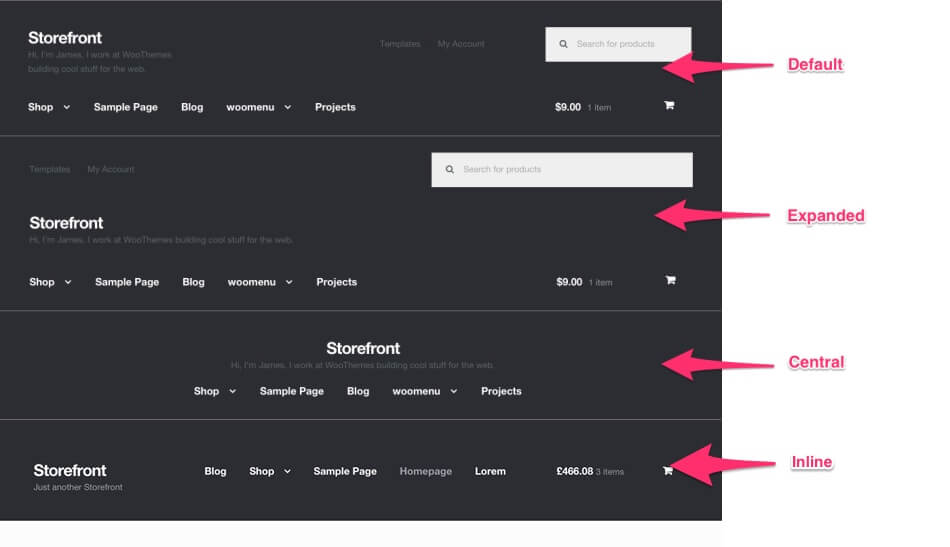
WooCommerce Storefront Designer is an extension for the Storefront theme, the free default theme from the WooCommerce team. The listing describes it as a way to change almost every part of Storefront's look without touching code: header layout, colours, fonts, text and checkout flow.
The description reads like the text for Storefront Powerpack, and the store lists a separate Powerpack product, so this may be the same extension under another name. The file on record dates from October 2017. Test it on a staging site with your current WordPress, WooCommerce and Storefront versions before use.
Requirements
- WooCommerce
- Storefront theme
Key features
- Header layout changes
- Change how the Storefront header is arranged.
- Colours and fonts
- Adjust colours and typography for most elements of the theme.
- Text changes
- Edit wording in parts of the storefront without touching template files.
- Checkout flow options
- The listing says checkout flow can be adjusted; the documentation will list which options exist.
Is it right for you?
A good fit for
- Shops already running the Storefront theme that want more design control without a child theme
- Store owners who prefer settings screens to editing code
Look elsewhere if
- Sites that use a different theme, since this is built around Storefront
- Shops that need pixel-exact custom designs, which usually call for a page builder or custom code
How to install WooCommerce Storefront Designer 1.8.4
- 1
Download the file
Open My Account → Downloads and download the product. If the archive contains several zips (documentation, child theme, licensing files), you need the one named after the product.
- 2
Upload it to WordPress
In your dashboard go to Plugins → Add New Plugin → Upload Plugin and choose the zip.
- 3
Install and activate
Click Install Now, then Activate. If an older or free copy is already installed, WordPress offers to replace it with the uploaded version.
Notes for this product
- Activate the Storefront theme first. The settings only apply to Storefront and have no effect on other themes.
Setup: using WooCommerce Storefront Designer 1.8.4
- Activate Storefront. Make sure Storefront is the active theme on a staging copy of your store.
- Open the new settings. After activating the plugin, look in the WordPress Customizer or the WooCommerce area for its design options.
- Start with the header and colours. Change the header layout and colour scheme, then check the preview on desktop and phone.
- Review shop and checkout pages. Walk through a product, the cart and checkout to confirm your changes look right.
Common problems and fixes
The design options don't appear or have no effect
- Why it happens
- The active theme isn't Storefront, or a child theme overrides the same styles.
- How to fix it
- Switch to Storefront or its child theme, then clear any caching plugin before checking again.
“The link you followed has expired.” when uploading
- Why it happens
- The zip is larger than your server's PHP upload limit (upload_max_filesize / post_max_size).
- How to fix it
- Raise the upload limit in your hosting control panel, or unzip the file and upload the folder to wp-content/plugins with your host's file manager or SFTP.
“The package could not be installed. No valid plugins were found.”
- Why it happens
- The uploaded zip is a bundle (or a theme), not the plugin itself.
- How to fix it
- Unzip the download once and upload the inner zip named after the plugin.
“Plugin could not be activated because it triggered a fatal error.”
- Why it happens
- Usually a PHP version older than the plugin needs, or a second copy of the same plugin (for example the free version) still active.
- How to fix it
- Check your PHP version under Tools → Site Health → Info, deactivate any other copy of the plugin, and enable WP_DEBUG_LOG to see the exact error.
Licence or “updates unavailable” notices
- Why it happens
- The developer's licence key isn't included. Features that call the developer's servers (template libraries, cloud APIs, automatic updates) need it.
- How to fix it
- Everything that runs locally works without it. For a newer file, use Request an update from your account.
Alternatives to WooCommerce Storefront Designer 1.8.4
| Product | Choose it if | Price |
|---|---|---|
| WooCommerce Storefront Powerpack 1.6.3 | you want to compare the Powerpack listing, whose description matches this one. | $4.90 |
| Storefront WooCommerce Customiser 1.9.2 | you want another way to customise the Storefront theme from the WordPress Customizer. | $5.20 |
Frequently asked questions
Does it work with themes other than Storefront?
No. The listing describes it as a tool for styling Storefront.
Is this the same as Storefront Powerpack?
The description matches Powerpack and the listing is unclear. Check the plugin name inside the package to see what you have.
Will it work with current WooCommerce?
The file dates from October 2017, so test it on a staging copy first.
Categories: WooCommerce, woocommerce plugin, Content
Related products
 −95%
−95%Zenex – eCommerce WooCommerce Theme
 −93%
−93%YITH WooCommerce Quick Checkout for Digital Goods Premium 1.26.0
 −93%
−93%YITH WooCommerce Order Tracking Premium 2.14.0
 −93%
−93%YITH PayPal Payouts for WooCommerce 1.0.23
 −84%
−84%WooZone Amazon Contextual Recommendations Plugin 1.3
 −93%
−93%WooThemes Live Wire Premium Theme 2.5.2
 −97%
−97%WooCommerce Subscriptions 4.0.2
 −84%
−84%