
WooCommerce One Page Checkout 2.45
SKU: 575
One-time payment · lifetime access to this file
- Instant download after purchase
- 100% original, unmodified GPL file
- Free lifetime updates on request
- Secure Razorpay / PayPal checkout
Product details
- Version on file
- 2.45
- Developer
- WooCommerce
- Released
- 2022/10/31
- File size
- 97.70 KB
- License
- GPL
About WooCommerce One Page Checkout 2.45
WooCommerce One Page Checkout puts the product choice and the checkout form on the same page. Customers can add products to an order, remove them and pay without leaving the page, which shortens the route from deciding to buying. It is a good fit when you sell a small number of products, or when each landing page is built around a single offer.
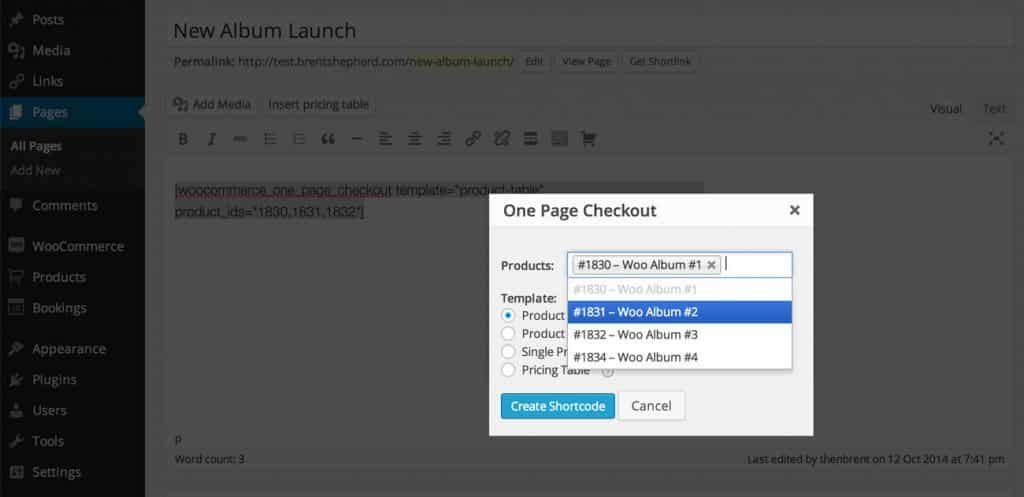
You add the checkout to a page with a WordPress shortcode, which means it can go on any page, post or custom post type. A page can list several products to pick from, or be set up for one specific product, so you can build a sales page with the order form already on it.
The plugin comes from the WooCommerce team and needs WooCommerce. It's most useful for campaign and landing pages. A large catalogue is better served by WooCommerce's normal shop, cart and checkout.
Requirements
- WooCommerce
Key features
- Product choice and checkout together
- Customers pick products and pay on one page, with no separate cart step.
- Add and remove products in place
- Customers change their order on the page without leaving it.
- Shortcode placement
- Insert the checkout fields into any page, post or custom post type with a shortcode.
- Landing page friendly
- Build a sales page with the order form already on it.
- Built for WooCommerce
- Uses WooCommerce products, payment gateways and orders.
Is it right for you?
A good fit for
- Landing pages and campaigns built around one or a few offers
- Shops with a small catalogue where a multi-step checkout feels slow
- Merchants who want a short path from interest to payment
Look elsewhere if
- Large catalogues that customers browse across many categories
- Stores that need a full cart-review step before payment
How to install WooCommerce One Page Checkout 2.45
- 1
Download the file
Open My Account → Downloads and download the product. If the archive contains several zips (documentation, child theme, licensing files), you need the one named after the product.
- 2
Upload it to WordPress
In your dashboard go to Plugins → Add New Plugin → Upload Plugin and choose the zip.
- 3
Install and activate
Click Install Now, then Activate. If an older or free copy is already installed, WordPress offers to replace it with the uploaded version.
Setup: using WooCommerce One Page Checkout 2.45
- Create a page for the offer. Add a new page where the order form should appear.
- Insert the checkout shortcode. Add the One Page Checkout shortcode, listing the products customers can choose from.
- Choose the products. Pick which products appear on the page, or set it up for one specific product.
- Write the offer copy. Add the text and images that explain the offer above the order form.
- Place a test order. Pay with a test gateway and check that the order and confirmation emails come through.
- Check phones. Complete an order on a phone to make sure the page is easy to use.
Common problems and fixes
The checkout fields don't show on the page
- Why it happens
- The shortcode is missing or wrong, or your page builder isn't rendering it.
- How to fix it
- Check the shortcode text, put it in a plain shortcode or text block, and look for a conflicting checkout customisation.
Changing quantities doesn't update the total
- Why it happens
- A script conflict, or a caching or optimisation plugin interfering with the page's JavaScript.
- How to fix it
- Exclude the page from caching and script optimisation, and check the browser console for errors.
The page is cached and shows another customer's details
- Why it happens
- A page cache is serving the checkout page to different visitors.
- How to fix it
- Exclude the page from page caching, as you would WooCommerce's normal checkout.
“The link you followed has expired.” when uploading
- Why it happens
- The zip is larger than your server's PHP upload limit (upload_max_filesize / post_max_size).
- How to fix it
- Raise the upload limit in your hosting control panel, or unzip the file and upload the folder to wp-content/plugins with your host's file manager or SFTP.
“The package could not be installed. No valid plugins were found.”
- Why it happens
- The uploaded zip is a bundle (or a theme), not the plugin itself.
- How to fix it
- Unzip the download once and upload the inner zip named after the plugin.
“Plugin could not be activated because it triggered a fatal error.”
- Why it happens
- Usually a PHP version older than the plugin needs, or a second copy of the same plugin (for example the free version) still active.
- How to fix it
- Check your PHP version under Tools → Site Health → Info, deactivate any other copy of the plugin, and enable WP_DEBUG_LOG to see the exact error.
Licence or “updates unavailable” notices
- Why it happens
- The developer's licence key isn't included. Features that call the developer's servers (template libraries, cloud APIs, automatic updates) need it.
- How to fix it
- Everything that runs locally works without it. For a newer file, use Request an update from your account.
Alternatives to WooCommerce One Page Checkout 2.45
| Product | Choose it if | Price |
|---|---|---|
| CartFlows Pro 1.8.0 | you want full sales funnels, with upsells and order bumps, not just a one-page order form. | $4.25 |
| YITH WooCommerce One-Click Checkout Premium 1.27.0 | you want to skip the cart and send shoppers straight to checkout from the product page. | $7.98 |
| YITH WooCommerce Multi-Step Checkout Premium 2.21.0 | you'd rather split a long checkout into clear steps than put everything on one page. | $4.65 |
Frequently asked questions
Does it replace the normal WooCommerce checkout?
No. It adds a one-page checkout that you place on specific pages with a shortcode. The standard checkout stays as it is.
Can I use it with one product?
Yes. A page can be set up for a single product, which suits sales pages.
Does it work with my payment gateway?
It uses WooCommerce's checkout, so gateways that work in WooCommerce generally work here. Test yours before launch.
Where can I put the checkout?
On any page, post or custom post type, using the shortcode.
Categories: E-commerce plugin
Related products
 −93%
−93%YITH WooCommerce Order Tracking Premium 2.14.0
 −85%
−85%WooSlider Products Slideshow 1.0.23
 −97%
−97%WooCommerce Subscriptions 4.0.2
 −91%
−91%WooCommerce Give Products 1.1.20
 −94%
−94%WooCommerce Account Funds 3.0.0
 −90%
−90%Theme Junkie Saha WordPress Theme 1.0.1
−94%YITH WooCommerce Wishlist Premium 3.26.0
 −92%
−92%