
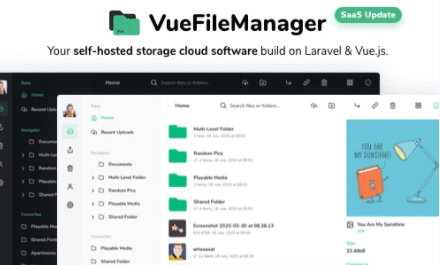
Vue File Manager with Laravel – Your Private Cloud
Version 2.2.7
SKU: 359
One-time payment · lifetime access to this file
- Instant download after purchase
- 100% original, unmodified GPL file
- Free lifetime updates on request
- Secure Razorpay / PayPal checkout
Product details
- Version on file
- 2.2.7
- Type
- plugin
- Released
- 25-11-2021
- File size
- 94.5 MB
- License
- GPL
About Vue File Manager with Laravel – Your Private Cloud 2.2.7
Vue File Manager with Laravel is a self-hosted private cloud: a web application you install on your own server to store files, organise them in folders and share them with other people. It has a Vue front end and a Laravel back end, and it behaves like a hosted file service, except the files and the accounts live on your hosting.
It is not a WordPress plugin, despite the older description on this page and the store's Plugins category. It is a standalone PHP application with its own database and login, installed on a server of its own or a subdomain, and the download is large, around 94 megabytes, because it bundles its dependencies.
Running your own file service gives you control over storage and data, and it makes you the administrator. You handle server updates, backups and security, so it suits people comfortable with hosting, not those wanting a managed service.
Requirements
- A web server with PHP and a MySQL-style database
- Enough disk space for the files you store
Key features
- Self-hosted private cloud
- Keep files on your own server instead of a third-party storage service.
- File manager interface
- A browser-based file manager built with Vue, for uploading, organising and downloading files.
- Sharing
- Share files and folders with other people, so you don't have to send large attachments.
- User accounts
- Support for accounts, so different people can have their own space.
- Laravel back end
- Built on Laravel, a widely used PHP framework, which developers can extend.
Is it right for you?
A good fit for
- Developers and agencies who want a private file-sharing service for clients
- Teams who prefer to host their own storage instead of using a public cloud service
- Anyone comfortable installing and maintaining a PHP and database application
Look elsewhere if
- Anyone looking for a WordPress plugin: this installs on a server, not under Plugins
- Users who don't want to maintain a server, apply updates and manage backups
- People who need a managed, guaranteed-availability file service
How to install Vue File Manager with Laravel – Your Private Cloud 2.2.7
Notes for this product
- This is not installed from the WordPress dashboard. You normally upload the files to your web server, create a database and run the application's installer. Follow the documentation in the download for the exact steps and PHP version.
Setup: using Vue File Manager with Laravel – Your Private Cloud 2.2.7
- Check the server requirements. Confirm your hosting offers the PHP version and extensions listed in the documentation, and has the disk space you need.
- Create a database. Create an empty database and a user for it in your hosting control panel.
- Upload the application. Upload the files to a subdomain or folder on your server, with the public folder as the web root as the documentation describes.
- Run the installer. Open the application's address in a browser, enter the database details and create your admin account.
- Configure storage and email. Set where files are stored and set up outgoing email for invitations and notifications.
- Upload and share a test file. Upload a file, share it and open the link in a private window to confirm everything works.
Common problems and fixes
The installer or the application shows a server error
- Why it happens
- The wrong folder is set as the web root, file permissions are too strict, or a required PHP extension is missing.
- How to fix it
- Point the web root at the application's public folder, make the storage folders writable, enable the PHP extensions in the documentation and check the server's error log.
Large file uploads fail
- Why it happens
- Your server's PHP upload limits are lower than the file's size.
- How to fix it
- Raise the upload and post size limits and the execution time in your hosting panel, then retry.
Emails for invitations or password resets don't arrive
- Why it happens
- Outgoing mail isn't configured, or the host blocks the default mail function.
- How to fix it
- Set up SMTP details in the application's mail settings and send a test message.
Alternatives to Vue File Manager with Laravel – Your Private Cloud 2.2.7
| Product | Choose it if | Price |
|---|---|---|
| File Manager Plugin For WordPress 7.5.0 | you only want to manage your WordPress site's own files from the dashboard, not run a separate cloud application. | $3.99 |
Frequently asked questions
Is this a WordPress plugin?
No. It is a standalone Laravel application you install on your own server. The older description for this product calls it a WordPress plugin, which is a mistake.
Where are my files stored?
On your own server, in the storage you configure. That makes you responsible for backups and security.
Can I share files with people outside my team?
Yes, the application supports sharing, so others can open the files you share.
What hosting does it need?
A web server with the PHP version and database listed in the documentation, plus enough disk space for your files.
Why is the download so large?
The package bundles the application's dependencies, which is why it is around 94 megabytes.
Categories: Business, Plugins, Business Service
Related products
 −95%
−95%Zenex – eCommerce WooCommerce Theme
 −93%
−93%Zarja – WordPress Blog Theme
 −93%
−93%Yottis | Personal Creative Portfolio WordPress Theme + Store 1.0
 −93%
−93%YITH WooCommerce Quick Checkout for Digital Goods Premium 1.26.0
 −93%
−93%YITH WooCommerce Order Tracking Premium 2.14.0
 −93%
−93%YITH PayPal Payouts for WooCommerce 1.0.23
 −93%
−93%Yankee – Insurance & Consulting WordPress Theme 1.3
 −92%
−92%