
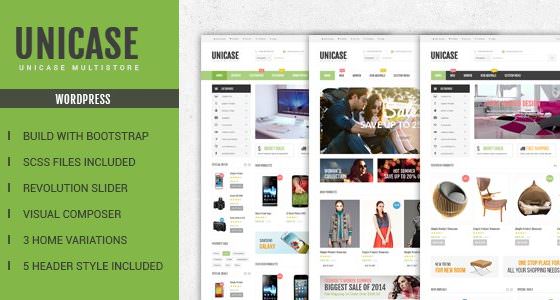
Unicase Electronics Store WooCommerce Theme
Version 1.6.6
SKU: 4490
One-time payment · lifetime access to this file
- Instant download after purchase
- 100% original, unmodified GPL file
- Free lifetime updates on request
- Secure Razorpay / PayPal checkout
Product details
- Version on file
- 1.6.6
- Marketplace
- Themeforest
- Type
- Theme
- Released
- August 30, 2017
- License
- GPL
- Live demo
- View the developer's demo
About Unicase Electronics Store WooCommerce Theme 1.6.6
Unicase is a WordPress theme for WooCommerce electronics shops, filed under WooCommerce and Electronic. The listing describes it as responsive and built with Bootstrap 3 and SASS. It suits a catalogue-style store with a large menu.
The listing mentions importable dummy data, several header styles, colour schemes, boxed and stretched layouts, a megamenu and WPML compatibility. The file on record is version 1.6.6 from August 2017, so test it on a staging site with your current WordPress, PHP and WooCommerce before launch.
Requirements
- WooCommerce
Key features
- Header and colour options
- The listing mentions five pre-defined header styles and six colour schemes.
- Responsive megamenu
- A large menu for browsing many categories.
- Boxed and stretched layouts
- You can choose between the two page widths.
- Importable dummy data
- Sample content you can import to see the intended layout.
- WPML compatible
- Listed as compatible with the WPML translation plugin.
Is it right for you?
A good fit for
- Electronics and gadget shops on WooCommerce
- Stores with many categories that need a megamenu
Look elsewhere if
- Sites that need a block editor or Elementor design, which the listing doesn't mention
- Stores that need a theme confirmed to work with current WooCommerce
How to install Unicase Electronics Store WooCommerce Theme 1.6.6
- 1
Download the file
Open My Account → Downloads and download the product. If the archive contains several zips (documentation, child theme, licensing files), you need the one named after the product.
- 2
Find the installable theme zip
Theme packages often bundle the theme, a child theme, plugins and docs. The installable theme is the zip that has style.css at its top level.
- 3
Upload it to WordPress
Go to Appearance → Themes → Add New Theme → Upload Theme, choose the theme zip, then Install Now and Activate.
- 4
Install the recommended plugins
Most premium themes show a notice listing their required plugins. Install those before importing any demo content.
Notes for this product
- Install and activate WooCommerce before importing the dummy data, so products and categories import properly.
Getting started: using Unicase Electronics Store WooCommerce Theme 1.6.6
- Activate and install plugins. Activate Unicase and WooCommerce, plus anything the theme asks for.
- Import the dummy data. Import the sample content to see the layout, then replace it with yours.
- Choose header and colours. Pick a header style and colour scheme in the theme options.
- Add products and build the menu. Add categories and products, then set up the megamenu.
- Test checkout. Place a test order and check the cart and checkout pages.
Common problems and fixes
Cart or checkout pages look broken or lose styling
- Why it happens
- A 2017 theme may use WooCommerce template files that are older than your installed WooCommerce.
- How to fix it
- Check Status in WooCommerce for outdated template overrides and update or remove them on a staging copy.
“The package could not be installed. The theme is missing the style.css stylesheet.”
- Why it happens
- The full download package was uploaded instead of the theme zip inside it.
- How to fix it
- Unzip the package and upload the zip that contains style.css at its top level.
“The link you followed has expired.” when uploading
- Why it happens
- The zip is larger than your server's PHP upload limit (upload_max_filesize / post_max_size).
- How to fix it
- Raise the upload limit in your hosting control panel, or unzip the file and upload the folder to wp-content/themes with your host's file manager or SFTP.
Demo import stops part-way or times out
- Why it happens
- The server hits its execution-time or memory limit during the import.
- How to fix it
- Raise max_execution_time and memory_limit with your host, then re-run the importer; importing content, widgets and settings separately also helps.
Pages look broken right after activating
- Why it happens
- The theme's required plugins (page builder, theme core plugin) aren't installed yet.
- How to fix it
- Install and activate everything in the theme's required-plugins notice, then reload.
Alternatives to Unicase Electronics Store WooCommerce Theme 1.6.6
| Product | Choose it if | Price |
|---|---|---|
| Electro Electronics Store WooCommerce Theme 3.2.3 | you want another well-known electronics WooCommerce theme. | $4.59 |
| MediaCenter – Electronics Store WooCommerce Theme 2.7.17 | you want a different electronics store theme to compare. | $4.25 |
Frequently asked questions
Does it need WooCommerce?
Yes, it is a WooCommerce electronics theme.
Can I translate the shop?
The listing says it is WPML compatible.
Will it work with the current WooCommerce?
The file dates from August 2017, so test it on a staging site first.
Categories: WooCommerce, ecommerce theme, Premium Theme, Themes, Electronic
Related products
 −95%
−95%Zenex – eCommerce WooCommerce Theme
 −93%
−93%Zarja – WordPress Blog Theme
 −93%
−93%Yottis | Personal Creative Portfolio WordPress Theme + Store 1.0
 −93%
−93%YITH WooCommerce Quick Checkout for Digital Goods Premium 1.26.0
 −93%
−93%YITH WooCommerce Order Tracking Premium 2.14.0
 −93%
−93%Yankee – Insurance & Consulting WordPress Theme 1.3
 −93%
−93%WPMU DEV Fixer WordPress Theme 1.4.1
 −84%
−84%