
Ogone for WooCommerce
Version 1.13.0
SKU: 122
One-time payment · lifetime access to this file
- Instant download after purchase
- 100% original, unmodified GPL file
- Free lifetime updates on request
- Secure Razorpay / PayPal checkout
Product details
- Version on file
- 1.13.0
- Developer
- WooCommerce
- Type
- Plugin
- Released
- October 7, 2017
- License
- GPL
- Live demo
- View the developer's demo
About Ogone for WooCommerce 1.13.0
Ogone for WooCommerce is a payment gateway extension from the WooCommerce team. It adds Ogone as a payment method at checkout, so shoppers are sent to the Ogone payment page and the order status in WooCommerce is updated from the result.
The file on record is version 1.13.0, released in October 2017. The title and web address show 1.12.1, so go by the version inside the package. The Ogone name has since moved under Ingenico and later Worldline, so confirm with your provider that your account still uses the Ogone integration. Test in sandbox mode before any live payment.
Requirements
- WooCommerce
- An Ogone merchant account
Key features
- Ogone at checkout
- Adds Ogone as a payment option in WooCommerce checkout.
- Written for WooCommerce
- Produced by WooCommerce itself, so it follows the standard gateway settings screens.
- Order status updates
- Payment results are meant to update the WooCommerce order, so you can see paid and failed orders.
- Payment Gateway category
- Filed under payment gateways, so it works with the Payments settings in WooCommerce.
Is it right for you?
A good fit for
- Merchants who already have an Ogone account and want it in WooCommerce
- Stores moving an older Ogone setup to a new site
Look elsewhere if
- Stores that do not have an Ogone account, since the plugin has nothing to connect to
- Sites using only block-based checkout without testing, as gateways from 2017 may not support it
How to install Ogone for WooCommerce 1.13.0
- 1
Download the file
Open My Account → Downloads and download the product. If the archive contains several zips (documentation, child theme, licensing files), you need the one named after the product.
- 2
Upload it to WordPress
In your dashboard go to Plugins → Add New Plugin → Upload Plugin and choose the zip.
- 3
Install and activate
Click Install Now, then Activate. If an older or free copy is already installed, WordPress offers to replace it with the uploaded version.
Notes for this product
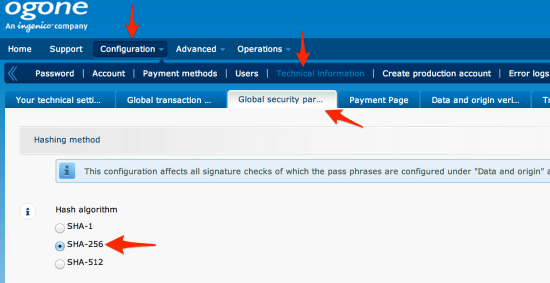
- Account-side details such as the SHA passphrase and return URLs are set in the Ogone back office, not in the plugin; the package documentation covers them.
Setup: using Ogone for WooCommerce 1.13.0
- Activate and open the gateway. Go to WooCommerce > Settings > Payments and open the Ogone entry.
- Enter your account details. Add your PSPID and the SHA passphrase from your Ogone account, and select test mode.
- Match the settings in Ogone. Set the same hash method and passphrase in the Ogone back office.
- Place a test order. Pay with a test card and confirm the order status changes in WooCommerce.
- Switch to live mode. Only after tests pass, enter live details and turn test mode off.
Common problems and fixes
The Ogone page shows an error such as 'unknown order'
- Why it happens
- The SHA-IN passphrase or hash method differs between WooCommerce and the Ogone back office.
- How to fix it
- Make both sides use the same passphrase and hashing method, with no stray spaces, and test again.
Customers pay but the order stays on pending
- Why it happens
- Ogone could not post the result back to your site, or a security plugin blocked the request.
- How to fix it
- Check the feedback URL in the Ogone back office, allow it through any firewall, and look at the WooCommerce logs.
“The link you followed has expired.” when uploading
- Why it happens
- The zip is larger than your server's PHP upload limit (upload_max_filesize / post_max_size).
- How to fix it
- Raise the upload limit in your hosting control panel, or unzip the file and upload the folder to wp-content/plugins with your host's file manager or SFTP.
“The package could not be installed. No valid plugins were found.”
- Why it happens
- The uploaded zip is a bundle (or a theme), not the plugin itself.
- How to fix it
- Unzip the download once and upload the inner zip named after the plugin.
“Plugin could not be activated because it triggered a fatal error.”
- Why it happens
- Usually a PHP version older than the plugin needs, or a second copy of the same plugin (for example the free version) still active.
- How to fix it
- Check your PHP version under Tools → Site Health → Info, deactivate any other copy of the plugin, and enable WP_DEBUG_LOG to see the exact error.
Licence or “updates unavailable” notices
- Why it happens
- The developer's licence key isn't included. Features that call the developer's servers (template libraries, cloud APIs, automatic updates) need it.
- How to fix it
- Everything that runs locally works without it. For a newer file, use Request an update from your account.
Alternatives to Ogone for WooCommerce 1.13.0
| Product | Choose it if | Price |
|---|---|---|
| WooCommerce Moneris Payment Gateway 3.3.1 | you use Moneris as your payment processor instead of Ogone | $4.99 |
| Elavon Converge Payment Gateway for WooCommerce 2.13.2 | your card processing runs through Elavon Converge | $4.25 |
| WooCommerce Authorize.Net CIM Payment Gateway 3.6.3 | you use Authorize.Net and want saved customer payment profiles | $3.99 |
Frequently asked questions
Do I need an Ogone account?
Yes. The plugin only connects WooCommerce to an existing Ogone merchant account.
Is Ogone still the same service?
The Ogone brand has been folded into Ingenico and later Worldline. Ask your provider which integration your account uses.
Can I try it without real payments?
Yes. Use test mode in the plugin and your Ogone test account, and only go live after a full test order.
Which version is in the file?
The file on record is 1.13.0. The page address mentions 1.12.1, which is older.
Categories: WooCommerce, woocommerce plugin, Payment Gateway
Related products
 −95%
−95%Zenex – eCommerce WooCommerce Theme
 −93%
−93%YITH WooCommerce Quick Checkout for Digital Goods Premium 1.26.0
 −93%
−93%YITH WooCommerce Order Tracking Premium 2.14.0
 −93%
−93%YITH PayPal Payouts for WooCommerce 1.0.23
 −84%
−84%WooZone Amazon Contextual Recommendations Plugin 1.3
 −93%
−93%WooThemes Live Wire Premium Theme 2.5.2
 −97%
−97%WooCommerce Subscriptions 4.0.2
 −84%
−84%