
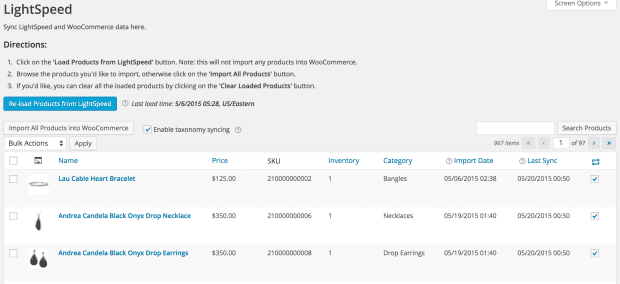
Lightspeed POS Integration for WooCommerce
Version 2.15.0
SKU: 771
One-time payment · lifetime access to this file
- Instant download after purchase
- 100% original, unmodified GPL file
- Free lifetime updates on request
- Secure Razorpay / PayPal checkout
Product details
- Version on file
- 2.15.0
- Developer
- WooCommerce
- Released
- 2022/10/27
- File size
- 855.00 KB
- License
- GPL
About Lightspeed POS Integration for WooCommerce 2.15.0
Lightspeed POS Integration for WooCommerce links a Lightspeed point-of-sale account to a WooCommerce online store. Shops that sell in person and online use it so the two sides don't drift apart: items sold at the till and online come from the same records, instead of being entered twice and fixed by hand.
In practice, integrations of this kind keep product details and stock levels aligned between the till and the website, and carry online orders and customers across. Which of those this version syncs, and in which direction, is set in the plugin's settings, so read them carefully before switching anything on for a live shop.
It needs a paid Lightspeed retail account, and Lightspeed has more than one retail product, so check which Lightspeed system this plugin supports before you set it up. The file on record is from October 2022; test the whole sync on a copy of your shop first, because mistakes in stock sync can oversell or hide products.
Requirements
- WooCommerce
- A Lightspeed retail point-of-sale account
Key features
- Lightspeed and WooCommerce link
- Connects your Lightspeed point-of-sale account to your WooCommerce store.
- Product and stock sync
- Keeps product details and stock levels aligned between the till and the website.
- Orders and customers
- Carries online orders and customer details across, according to the plugin's settings.
- Settings for what syncs
- Choose which data moves between the two systems and how often.
- For shops that sell in store and online
- Built for retailers who run a physical shop alongside a WooCommerce store.
Is it right for you?
A good fit for
- Retailers who use Lightspeed at the till and WooCommerce online
- Shops that want one stock count across both channels
- Merchants tired of entering products and orders twice
Look elsewhere if
- Shops that don't use Lightspeed, since the plugin is built for it
- Anyone who hasn't confirmed which Lightspeed retail product this plugin supports
- Stores unwilling to test a stock sync carefully before going live
How to install Lightspeed POS Integration for WooCommerce 2.15.0
- 1
Download the file
Open My Account → Downloads and download the product. If the archive contains several zips (documentation, child theme, licensing files), you need the one named after the product.
- 2
Upload it to WordPress
In your dashboard go to Plugins → Add New Plugin → Upload Plugin and choose the zip.
- 3
Install and activate
Click Install Now, then Activate. If an older or free copy is already installed, WordPress offers to replace it with the uploaded version.
Notes for this product
- Before you start, confirm which Lightspeed retail system this plugin supports, and back up your shop so you can undo a sync that goes wrong.
Setup: using Lightspeed POS Integration for WooCommerce 2.15.0
- Back up and test on a copy. Back up your shop and try the plugin on a staging copy first.
- Connect your Lightspeed account. Open the plugin's settings and authorise it to access your Lightspeed account.
- Choose what to sync. Select which products, stock, orders and customers should move between the systems, and in which direction.
- Match your products. Check that products are matched correctly between the two systems, for example by SKU.
- Run a small first sync. Sync a few products and confirm that names, prices and stock arrive correctly.
- Watch the first live days. Check stock levels and orders daily until you trust the sync.
Common problems and fixes
The connection to Lightspeed fails or keeps asking to reconnect
- Why it happens
- The authorisation has expired, or the account details have changed.
- How to fix it
- Reconnect from the plugin's settings, and check the Lightspeed account is active.
Stock levels don't match between the till and the website
- Why it happens
- Products aren't matched correctly, the sync hasn't run, or sales happened between syncs.
- How to fix it
- Check how products are matched, confirm the scheduled sync is running, and shorten the interval if sales are busy.
Scheduled syncs never run
- Why it happens
- WordPress's scheduled-task system only runs when someone visits the site, and it may be disabled on your host.
- How to fix it
- Visit the site to trigger it, or set up a real server cron job that calls wp-cron.php regularly.
“The link you followed has expired.” when uploading
- Why it happens
- The zip is larger than your server's PHP upload limit (upload_max_filesize / post_max_size).
- How to fix it
- Raise the upload limit in your hosting control panel, or unzip the file and upload the folder to wp-content/plugins with your host's file manager or SFTP.
“The package could not be installed. No valid plugins were found.”
- Why it happens
- The uploaded zip is a bundle (or a theme), not the plugin itself.
- How to fix it
- Unzip the download once and upload the inner zip named after the plugin.
“Plugin could not be activated because it triggered a fatal error.”
- Why it happens
- Usually a PHP version older than the plugin needs, or a second copy of the same plugin (for example the free version) still active.
- How to fix it
- Check your PHP version under Tools → Site Health → Info, deactivate any other copy of the plugin, and enable WP_DEBUG_LOG to see the exact error.
Licence or “updates unavailable” notices
- Why it happens
- The developer's licence key isn't included. Features that call the developer's servers (template libraries, cloud APIs, automatic updates) need it.
- How to fix it
- Everything that runs locally works without it. For a newer file, use Request an update from your account.
Frequently asked questions
Do I need a Lightspeed account?
Yes. It connects an existing Lightspeed retail account to WooCommerce, and that account is a separate paid service.
What does it sync?
Products and stock, and orders and customers according to its settings. Check which data moves in which direction before you switch it on.
Which Lightspeed product does it support?
Lightspeed has more than one retail system, so confirm which this plugin supports before you set it up.
Is it safe to try on a live shop?
Test on a staging copy first, since a stock sync mistake can oversell or hide products.
Categories: Wordpress Plugins, eCommerce, WooCommerce, woocommerce plugin, E-commerce plugin, Plugins, Wordpress
Related products
 −94%
−94%Zyra – The Clean, Minimal Shopify Theme
 −95%
−95%Zenex – eCommerce WooCommerce Theme
 −77%
−77%Zakas – Fashion HTML Template
 −93%
−93%Yottis | Personal Creative Portfolio WordPress Theme + Store 1.0
 −93%
−93%YITH WooCommerce Quick Checkout for Digital Goods Premium 1.26.0
 −93%
−93%YITH WooCommerce Order Tracking Premium 2.14.0
 −93%
−93%YITH PayPal Payouts for WooCommerce 1.0.23
 −93%
−93%