
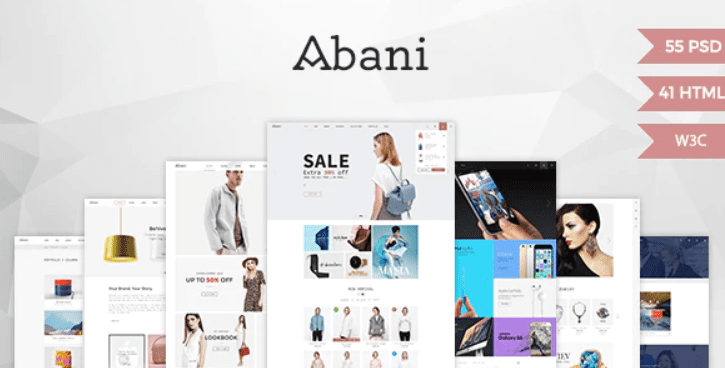
Abani – Multi Purpose eCommerce HTML Template
SKU: 2157
One-time payment · lifetime access to this file
- Instant download after purchase
- 100% original, unmodified GPL file
- Free lifetime updates on request
- Secure Razorpay / PayPal checkout
Product details
- Type
- Theme
- Released
- June 15, 2020
About Abani – Multi Purpose eCommerce HTML Template
Abani is a static HTML template for an online shop front end. In the store it is filed under eCommerce, Blog and HTML5, and one category mentions jewellery. You get ready-made HTML pages that you edit by hand or in a code editor.
A static template is a design, not a working shop. The pages have no cart, checkout or product database of their own. To sell, you need to connect it to an e-commerce back end or build one. The listing says its code is SEO optimised and its interface components are customisable, and gives no other details.
Key features
- Multi-purpose shop design
- A general eCommerce layout rather than one for a single product type.
- Customisable components
- The listing says interface components can be changed to your taste.
- Ready-to-use pages
- The pages work as supplied, so you edit content instead of building from scratch.
- Blog pages
- Filed under Blog, so articles can sit beside the shop pages.
- Search-friendly markup
- The listing says the code is optimised for SEO.
Is it right for you?
A good fit for
- Developers who need a shop design to wire into their own back end
- Designers who want ready HTML pages for a client mockup
Look elsewhere if
- Anyone who expects a working cart and checkout out of the box
- WordPress or Shopify owners who want a theme they can install
How to install Abani – Multi Purpose eCommerce HTML Template
- 1
Download the file
Open My Account → Downloads and download the product. If the archive contains several zips (documentation, child theme, licensing files), you need the one named after the product.
- 2
Preview and edit
Unzip the template and open the HTML files in a code editor. Text lives in the .html files; colours and fonts are in the CSS.
- 3
Upload to your host
Upload the template folder's contents to your site's public folder (often public_html) with your host's file manager or SFTP, keeping the folder structure intact.
Notes for this product
- This is plain HTML, CSS and JavaScript files. Open index.html to preview it, and check the package for a documentation folder.
Setup: using Abani – Multi Purpose eCommerce HTML Template
- Unzip and preview. Open index.html in a browser, or serve the folder locally.
- Replace branding and text. Edit logo, headings, colours and copy in the HTML and CSS files.
- Swap product content. Replace sample products and images with your own.
- Connect a back end. Wire the cart and checkout to your e-commerce system or developer.
- Upload to hosting. Publish the folder to your web server and test every link.
Common problems and fixes
Add to cart and checkout buttons do nothing
- Why it happens
- A static HTML template has no shop back end.
- How to fix it
- Connect the buttons to a cart system, or link them to your store platform.
The contact form doesn't send
- Why it happens
- Static templates need a server-side script or a form service to deliver mail.
- How to fix it
- Configure the template's mail script with your address on a host that supports PHP mail or SMTP, or connect a form service.
Sliders, fonts or maps don't work when opening index.html directly
- Why it happens
- Browsers block some scripts on file:// pages.
- How to fix it
- Preview through a local server (for example VS Code Live Server) or after uploading to your host.
Alternatives to Abani – Multi Purpose eCommerce HTML Template
| Product | Choose it if | Price |
|---|---|---|
| Maxshop – Responsive & Multi-Purpose eCommerce HTML Template | you want another responsive multi-purpose eCommerce HTML template. | $4.59 |
| ECOSHOP – Multipurpose eCommerce HTML5 Template | you want a multipurpose eCommerce HTML5 template to compare. | $3.99 |
| Ezone – Mega Shop eCommerce HTML Template | you want a larger shop layout. | $3.99 |
Frequently asked questions
Is it a WordPress theme?
No. It is a static HTML template and can't be uploaded under Appearance, Themes.
Does it have a working cart and checkout?
No. It supplies the design; the shop back end is separate.
Do I need to code?
You need basic HTML and CSS to edit it, and a developer to connect a back end.
Categories: eCommerce, Blog, ecommerce theme, HTML5, Jewellery Elementor Template Kit
Related products
 −94%
−94%Zyra – The Clean, Minimal Shopify Theme
 −95%
−95%Zenex – eCommerce WooCommerce Theme
 −93%
−93%Zarja – WordPress Blog Theme
 −77%
−77%Zakas – Fashion HTML Template
 −93%
−93%Yottis | Personal Creative Portfolio WordPress Theme + Store 1.0
 −93%
−93%Yankee – Insurance & Consulting WordPress Theme 1.3
 −93%
−93%WooThemes SMPL Premium Theme 1.4.5
 −93%
−93%